.%20--%3e%3csvg%20xmlns='http://www.w3.org/2000/svg'%20viewBox='0%200%201610%20300'%3e%3cdefs%3e%3clinearGradient%20id='kb'%20x1='0'%20y1='0'%20x2='0'%20y2='300'%20gradientUnits='userSpaceOnUse'%3e%3cstop%20offset='0'%20stop-color='%2373c6e5'/%3e%3cstop%20offset='.25'%20stop-color='%2352b5dc'/%3e%3cstop%20offset='.5'%20stop-color='%233a9fc8'/%3e%3cstop%20offset='.75'%20stop-color='%232b82ae'/%3e%3cstop%20offset='1'%20stop-color='%231a6490'/%3e%3c/linearGradient%3e%3c/defs%3e%3cg%20fill='url(%23kb)'%20fill-rule='evenodd'%3e%3cpath%20d='M0%20300V0H86V136H160V0H246V164H166V219H246V300H160V219H86V300Z'/%3e%3cpath%20d='M401%2083H321V0H567V83H487V219H567V300H321V219H401Z'/%3e%3cpath%20d='M642%20300V0H728V83H808V136H882V0H968V300H882V219H802V164H728V300Z'/%3e%3cpath%20d='M1043%20300V0H1289V164H1209V219H1289V300H1203V219H1129V300ZM1129%2083V136H1203V83Z'/%3e%3cpath%20d='M1364%20300V83H1444V0H1610V300H1524V219H1450V300ZM1450%2083V136H1524V83Z'/%3e%3c/g%3e%3c/svg%3e)
Kinra Space / Make it yours
Devices and installation
Keep Space in its own window and understand what needs a connection.
Experimental · private access. Public signup is not open.
Read as MarkdownYou can use Space in a browser or install it as a web app on your device. Installation adds an app window or icon for an existing Space; it does not download the personal machine or create another home.
Install from your browser
Open Your account → Settings → Keep Space close for the instructions appropriate to your browser. If Install Kinra Space appears, choose it and complete the browser’s prompt.
| Browser or device | Manual installation path |
|---|---|
| Safari on iPhone or iPad | Share → Add to Home Screen; leave Open as Web App enabled when offered. |
| Safari on Mac | File → Add to Dock. |
| Chrome or Edge | Use the install icon in the address bar or the browser’s installation menu. |
Open the installed Space icon afterward. The app window may need its own sign-in. If an installation action is unavailable, continue in the browser. Browser and operating-system support determine which controls are offered.
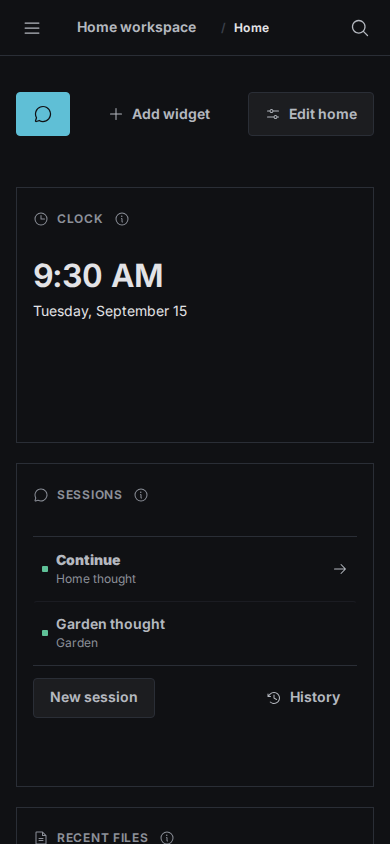
A Playwright capture at phone width with fictional content. It demonstrates responsive layout, not acceptance on a physical phone or every installed browser.
Work in a small window
Use the navigation drawer to switch pages and workspaces. The layout adapts to the available width when you resize or rotate. On a touch keyboard, Enter adds a line and Send submits your message. The composer adjusts to the visible area above the keyboard.
Appearance follows Settings → Appearance, and motion respects your device’s reduced-motion preference. File sharing is offered only when the browser supports it; Download remains the fallback.
Reconnect after going offline
Kin and files live on the machine, so Space needs a connection to reach them. An offline launch shows a reconnect page. It does not display cached private files or conversation history and does not queue messages to send later.
After reconnecting and signing in if needed, use Continue or History to return to the session. Unsent message text has a per-tab recovery copy; save file edits before leaving, because file-editor drafts are not that recovery copy.
A machine restart can interrupt work even though a browser disconnect alone does not. See Terminal and machine.