.%20--%3e%3csvg%20xmlns='http://www.w3.org/2000/svg'%20viewBox='0%200%201610%20300'%3e%3cdefs%3e%3clinearGradient%20id='kb'%20x1='0'%20y1='0'%20x2='0'%20y2='300'%20gradientUnits='userSpaceOnUse'%3e%3cstop%20offset='0'%20stop-color='%2373c6e5'/%3e%3cstop%20offset='.25'%20stop-color='%2352b5dc'/%3e%3cstop%20offset='.5'%20stop-color='%233a9fc8'/%3e%3cstop%20offset='.75'%20stop-color='%232b82ae'/%3e%3cstop%20offset='1'%20stop-color='%231a6490'/%3e%3c/linearGradient%3e%3c/defs%3e%3cg%20fill='url(%23kb)'%20fill-rule='evenodd'%3e%3cpath%20d='M0%20300V0H86V136H160V0H246V164H166V219H246V300H160V219H86V300Z'/%3e%3cpath%20d='M401%2083H321V0H567V83H487V219H567V300H321V219H401Z'/%3e%3cpath%20d='M642%20300V0H728V83H808V136H882V0H968V300H882V219H802V164H728V300Z'/%3e%3cpath%20d='M1043%20300V0H1289V164H1209V219H1289V300H1203V219H1129V300ZM1129%2083V136H1203V83Z'/%3e%3cpath%20d='M1364%20300V83H1444V0H1610V300H1524V219H1450V300ZM1450%2083V136H1524V83Z'/%3e%3c/g%3e%3c/svg%3e)
Kin / Use Kin
@-mentions
Attach files, line ranges, and images from the composer.
Read as MarkdownType @ in the composer to pull a file’s contents into your message. kin reads
the file at send time and includes it inline, so the model sees exactly what’s on
disk. See Keybindings & cursor mode for every other composer
key, and Slash commands for /tree and /view, the
tree-sidebar and read-only-peek commands mentioned below.
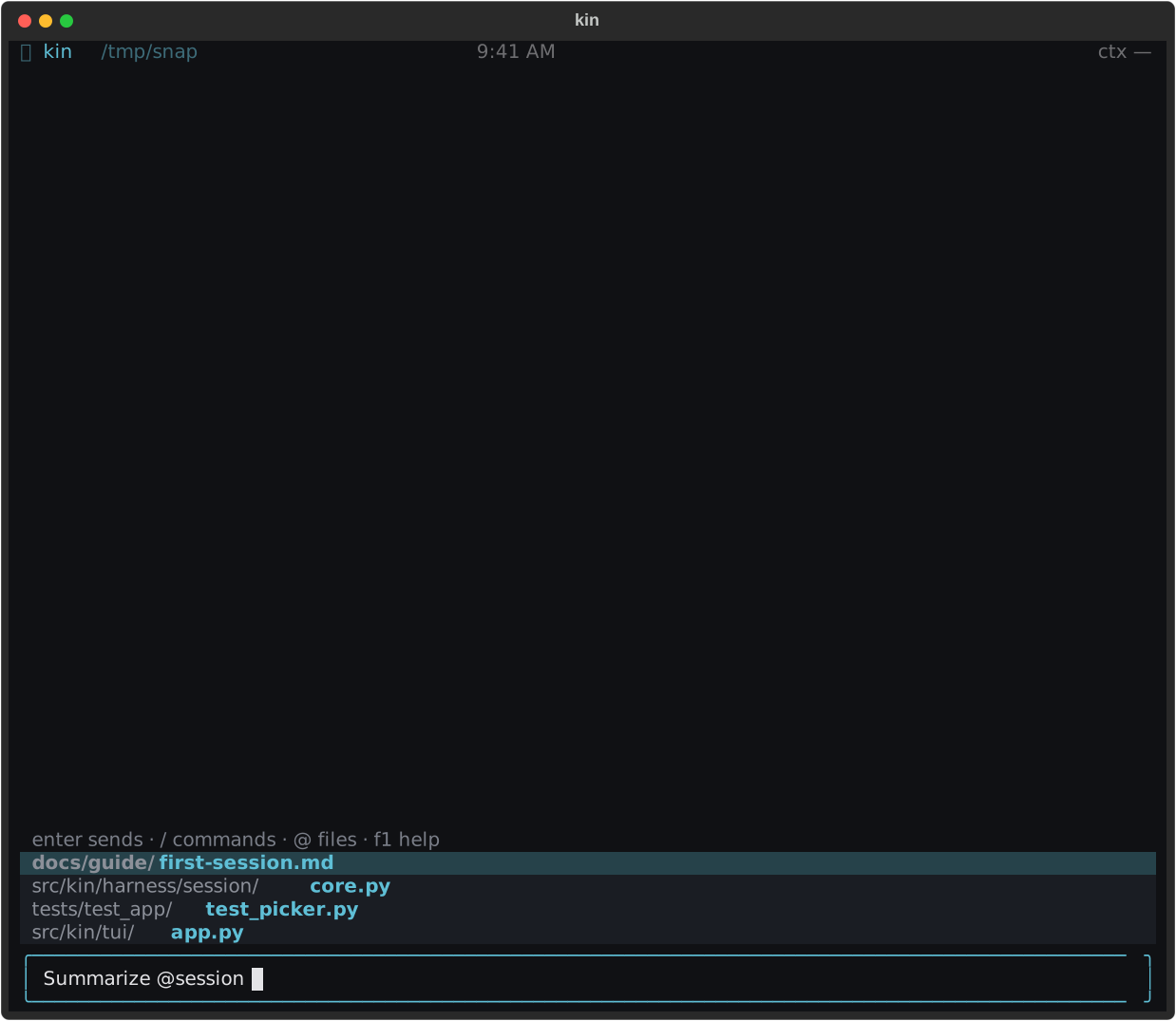
Using @ in the composer
Type @ (at the start of the message or after whitespace) and a file picker
opens above the composer. Keep typing to filter; the menu shows workspace-relative
paths ranked by how well they match.
| Key | Action |
|---|---|
| ++up++ / ++down++ | Move the highlight |
| ++tab++ or ++enter++ | Insert the highlighted path as @path |
| ++escape++ | Close the picker |
The picker inserts a path without previewing its contents. You can also type a mention directly and select a line range:
@src/kin/harness/loop.py:40-80@path:lo-hi attaches just those lines; @path:lo attaches one line. A mention
inside backticks (`@README`) stays literal, and an address-style
name@host never triggers because @ only fires at the start of the message or
after whitespace.
Paths with spaces (every macOS screenshot — Screenshot 2026-07-10 at 3.14.15 PM.png) have to be wrapped in double quotes:
@"Screenshot 2026-07-10 at 3.14.15 PM.png"
@"my code/my file.py":1-40
The picker is suppressed inside a quoted path (the token round-trips through
mention_token verbatim, so no fuzzy matching helps); the file tree (++ctrl+g++)
inserts the quoted form for you.
Pasting files (drag-drop + terminal paste)
Drop files or paste absolute paths to insert mentions. Kin recognizes newline-separated, shell-escaped, and single spaced paths only when the whole paste consists of existing files. Mixed prose, missing paths, or more than 4,096 characters stay literal. More than ten files produces a warning and inserts the paths as text. Quotes and shell escapes work in multiline drops too, including a single path followed by a newline.
On macOS, images over 5 MB are downscaled when sips succeeds; otherwise Kin
mentions the original and reports any attachment limit. Known credential
paths produce a warning and cannot have their contents attached.
Turn the whole thing off via KIN_PASTE_MENTIONS=0 or
paste_file_mentions = false in ~/.kin/settings.toml (project files
inherit). The toggle is project-safe and human-only. See
Environment variables and
Settings (TOML) for the full knob reference.
Capturing a clipboard image (macOS)
On macOS, Ctrl+V captures the clipboard image and inserts a mention. Text
paste is unaffected. Kin uses pngpaste when available, otherwise
osascript, and attempts the same oversize-image downscale as file drops.
Captures live in a private <session-id>.attachments/ directory beside the
journal. A best-effort sweep removes old captures after 30 days and skips
symlinked attachment directories and files. Missing captures produce a
readable not-found result. Other platforms report that
clipboard image capture is unavailable.
Tip
Picking a file in the toggleable file-tree sidebar (++ctrl+g++ or
/tree) inserts it as an@-mention — press ++v++ on the focused file to peek it in the read-only viewer instead (also/view <path>).
What gets expanded
When you send the message, each @path token is replaced with the file’s
contents, read with the same logic as the read_file tool — line numbers, PDF
and Word/Excel (.docx/.xlsx, macros in .docm/.xlsm ignored) text
extraction, and the 50 KB cap all apply. The path text you typed is kept
as a label, and the contents follow it inline. See Tools for how
read_file renders.
A mention that can’t be read never blocks the send: the token is left in place
with an inline (not attached: …) note (file not found, is a directory, binary,
or a read timeout), and the rest of the message goes through unchanged.
Names in kin’s read-deny list (is_secret_path) are refused before the
existence probe — @~/.ssh/id_rsa and a project-local @.env both fail
with a refused — known credential store note and never inline contents.
Image attachments use a by-reference marker: an @image.png mention inside the
5 MB cap becomes a harness-authored text marker (path + MIME + size + “View
it by calling read_file with this exact path”) rather than inline bytes. A
<system-reminder> on that turn instructs the model to call read_file on each
attached path before responding (and to batch the calls in a single round). The
bytes only enter the conversation through read_file’s audited vision path, so
the marker travels cleanly across provider swaps, compaction, and history
re-renders — and an oversize drop comes with a downscale hint instead of a
silent cap. Notebook mentions remain text-only — call read_notebook for
structured cell access.
Ranking & filtering
The picker ranks candidates with fuzzy matching over the full relative path (not
just the basename), so helper finds src/utils/helper.py. When the optional
rapidfuzz dependency is present it uses a weighted-ratio scorer; otherwise it
falls back to a stdlib substring match. An empty query shows the head of the
corpus.
The corpus is the set of files under your workspace. It honors .gitignore (via
the optional pathspec dependency) and always prunes heavy or noise directories
(.git, node_modules, __pycache__, .venv, dist, build, and similar),
capped at 10,000 files. It’s rebuilt on a 60-second TTL and the walk runs off the
UI thread, so a large repo can’t freeze the picker on the first keystroke.
Out-of-workspace files
A file inside your workspace is treated as ground-truth context and inlined directly. A file outside the workspace carries the same prompt-injection surface as a fetched web page, so its contents are wrapped in hardened untrusted-content framing before they enter the conversation. Symlinks are resolved before the membership check, so an in-workspace symlink that points outside still gets the untrusted framing. The model is told to treat that content as data, not instructions.
Troubleshooting
- The picker does not open:
@must begin the message or follow whitespace. Text inside backticks and address-likename@hoststays literal. - A path contains spaces: wrap it in double quotes or insert it from the file tree.
- The file was not attached: the inline note names the reason. Directories, missing/binary files, timeouts, and known credential paths are not inlined.
- Results feel stale: the candidate walk has a 60-second cache; send a hand-written path immediately or retry after it refreshes.