.%20--%3e%3csvg%20xmlns='http://www.w3.org/2000/svg'%20viewBox='0%200%201610%20300'%3e%3cdefs%3e%3clinearGradient%20id='kb'%20x1='0'%20y1='0'%20x2='0'%20y2='300'%20gradientUnits='userSpaceOnUse'%3e%3cstop%20offset='0'%20stop-color='%2373c6e5'/%3e%3cstop%20offset='.25'%20stop-color='%2352b5dc'/%3e%3cstop%20offset='.5'%20stop-color='%233a9fc8'/%3e%3cstop%20offset='.75'%20stop-color='%232b82ae'/%3e%3cstop%20offset='1'%20stop-color='%231a6490'/%3e%3c/linearGradient%3e%3c/defs%3e%3cg%20fill='url(%23kb)'%20fill-rule='evenodd'%3e%3cpath%20d='M0%20300V0H86V136H160V0H246V164H166V219H246V300H160V219H86V300Z'/%3e%3cpath%20d='M401%2083H321V0H567V83H487V219H567V300H321V219H401Z'/%3e%3cpath%20d='M642%20300V0H728V83H808V136H882V0H968V300H882V219H802V164H728V300Z'/%3e%3cpath%20d='M1043%20300V0H1289V164H1209V219H1289V300H1203V219H1129V300ZM1129%2083V136H1203V83Z'/%3e%3cpath%20d='M1364%20300V83H1444V0H1610V300H1524V219H1450V300ZM1450%2083V136H1524V83Z'/%3e%3c/g%3e%3c/svg%3e)
Kin / Get started
First session
Send work, inspect results, review actions, interrupt, and resume a Kin session.
Read as MarkdownStart Kin in the directory you want to work in. If no model is connected yet, follow Connect a model.
The screen at a glance
| Region | What it tells you |
|---|---|
| Git header | Known branch and clean/changed state; hidden when unavailable. |
| Transcript | Your messages, Kin’s replies, tool activity, and requests for attention. |
| Status bar | Current work or input hints, plus a non-default mode. |
| Composer | Your draft, completion menus, and any queued follow-up. |
| Session line | Model, effort, workspace, and context usage when available. |
Hover over shortened identity values to read them in full. The context pair,
such as 100k / 195k, means current prompt / hard prompt limit. It stays blank
until trustworthy usage arrives; /tokens explains the model window, output
reserve, auto-compaction point, and cumulative spend.
Fast path
1. Confirm the session
Check the welcome’s model and workspace. Hover or copy the panel for the full identity, including the session id. The compact Kinra emblem leads the name, and a divider separates any notices when there is room. In Auto, the trust line reminds you that shell commands run with your local authority; small terminals retain that information below the identity.
Press ++f1++ for searchable help. Type / for commands or ++ctrl+p++ for the
command palette. A palette choice stages a slash command in the composer;
press ++enter++ to run it, or ++ctrl+z++ to restore the draft it replaced.
2. Send a concrete outcome
Try:
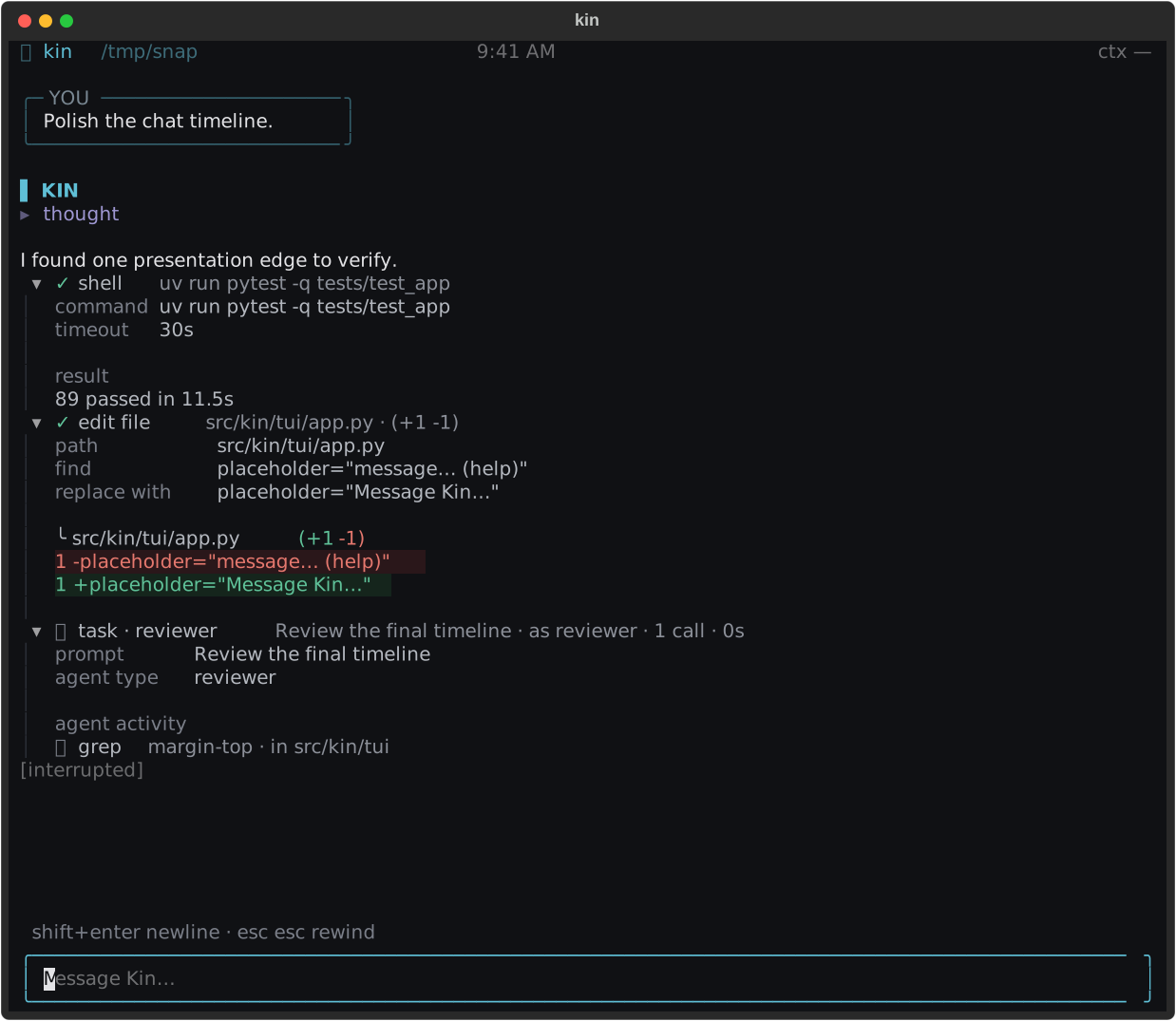
Explain this project's entry points and suggest one small improvement.++enter++ sends; ++shift+enter++ inserts a newline. Kin groups routine tools
and reasoning under activity labels such as reading files…. A completed
group shows its tool count and duration. Failures, interruptions, and
incomplete work keep explicit markers.
Open a group, then a tool or reasoning row, for detail. File edits show compact
diffs; commands show brief script/output previews. Expand them for the retained
result. Only edit_file and write_file receive a (+N -M) badge. Routine
failures stay marked without forcing detail open; requests for your input draw
attention.
3. Queue, take back, and interrupt
While Kin works, type a correction or follow-up and press ++enter++. Pending
messages are delivered in order at the next safe model boundary. During
compaction they wait until it finishes. The composer shows
steering · up edits · <preview> for active work or queued while waiting.
++up++ withdraws all pending messages into one editable draft. If you had started another draft, ++down++ restores it. A full queue keeps the new text in the composer and explains the limit; it does not replace an earlier message.
++esc++ interrupts the foreground turn. Partial text remains marked as interrupted, foreground work settles, and independent background agents continue. Open their panel with ++ctrl+o++.
4. Review an action
After workspace trust, Auto permits ordinary edits and shell commands with your local authority. ++shift+tab++ switches to Strict, which reviews edits and commands outside its narrow read-only allowance. Neither mode is an OS sandbox.
When review is needed, the modal shows the command or edit and offers Once, Always when reusable, or Deny. Always covers that call signature for the session. See Modes and approvals for protected actions and the full matrix.
5. Review a plan
Planning freezes implementation until you accept execution. The review offers:
- Approve & execute: keep the planning context and lift the freeze.
- Approve, clear & re-inject: start from the self-contained plan.
- Review plan first (adversarial): ask a critic for findings.
Kin can make bounded revisions to the saved plan while frozen. Dismissing the modal or reviewing a plan does not approve implementation. General file writes and shell execution remain blocked until acceptance.
6. Browse and resume
With an empty composer, ++ctrl+b++ enters cursor mode. Move with
++up++/++down++, open the focused item with ++tab++, and copy its complete
retained text with y. ++ctrl+t++ opens tool details; ++ctrl+n++ opens
reasoning. ++ctrl+f++ searches folded content and reveals the selected match.
++esc++ leaves cursor mode. Mouse clicks also expand rows.
Use /resume for the saved-session picker or /resume <id> for an exact
conversation. Another live writer holds a lease and prevents a second writer.
A normal ++ctrl+c++ quit saves the journal and closes background resources;
--no-save conversations cannot be resumed.
Sessions explains saved conversations, Herdr terminal persistence, and service attachment.
Alternative controls
Use ++ctrl+j++ for todos and ++ctrl+o++ for agents, background shells, and
tasks. /mode, /model, /providers, /tokens, /resume, and /help cover
common session controls. See Keybindings and
Slash commands for the full references.
Troubleshooting
- A follow-up disappeared: check whether it was delivered to the active turn. ++up++ retrieves still-pending messages; ++down++ restores the newer draft.
- A preview is too short: expand the row. Copy retains the complete delivered result, including any retrieval reference for larger output.
- Mode will not change: planning ends through plan review, not the mode toggle.
- Cursor mode will not start: send or clear the draft first.
- A session is missing: ephemeral sessions and child journals do not appear in the ordinary resume picker.