.%20--%3e%3csvg%20xmlns='http://www.w3.org/2000/svg'%20viewBox='0%200%201610%20300'%3e%3cdefs%3e%3clinearGradient%20id='kb'%20x1='0'%20y1='0'%20x2='0'%20y2='300'%20gradientUnits='userSpaceOnUse'%3e%3cstop%20offset='0'%20stop-color='%2373c6e5'/%3e%3cstop%20offset='.25'%20stop-color='%2352b5dc'/%3e%3cstop%20offset='.5'%20stop-color='%233a9fc8'/%3e%3cstop%20offset='.75'%20stop-color='%232b82ae'/%3e%3cstop%20offset='1'%20stop-color='%231a6490'/%3e%3c/linearGradient%3e%3c/defs%3e%3cg%20fill='url(%23kb)'%20fill-rule='evenodd'%3e%3cpath%20d='M0%20300V0H86V136H160V0H246V164H166V219H246V300H160V219H86V300Z'/%3e%3cpath%20d='M401%2083H321V0H567V83H487V219H567V300H321V219H401Z'/%3e%3cpath%20d='M642%20300V0H728V83H808V136H882V0H968V300H882V219H802V164H728V300Z'/%3e%3cpath%20d='M1043%20300V0H1289V164H1209V219H1289V300H1203V219H1129V300ZM1129%2083V136H1203V83Z'/%3e%3cpath%20d='M1364%20300V83H1444V0H1610V300H1524V219H1450V300ZM1450%2083V136H1524V83Z'/%3e%3c/g%3e%3c/svg%3e)
Kin / Use Kin
Sessions, resume & compaction
Every conversation is saved to disk as it happens, so you can quit and pick up where you left off, roll back a mistake, or trim a long context. This page covers the journal, resuming, rewinding, and compaction.
Read as MarkdownEvery conversation is saved to disk as it happens, so you can quit and pick up where you left off, roll back a mistake, or trim a long context. This page covers the journal, resuming, rewinding, and compaction.
Outcome
Move between live and saved work without losing the current conversation, and know when to resume, fork, rewind, or compact.
Fast path
- Press ++ctrl+l++ or run
/sessions. - Choose a live row to switch to its process, a saved row to resume, or New session here for an independent clean conversation.
- Use
/resumewhen you want only this project’s saved history. - Use
/forkbefore exploring a risky conversational branch. - Quit with ++ctrl+c++; normal sessions are already journaled as they run, and Kin leaves the exact resume command in the terminal.
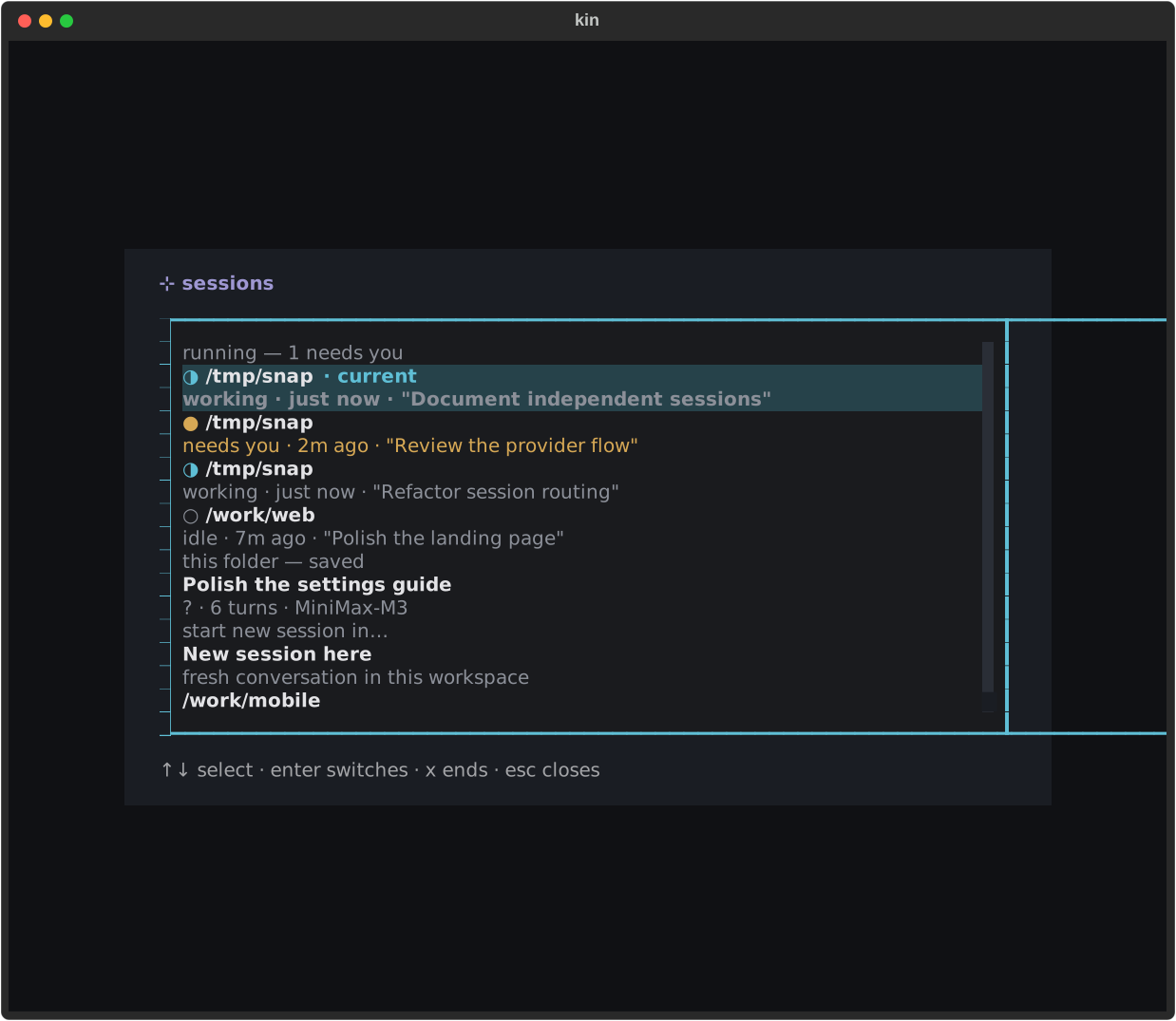
The switcher presents the action implied by each state: attach to live work, inspect waiting work, resume a saved journal, or start cleanly.
Alternative entry points
At launch
kin --continue resumes the newest session for the current project.
kin --resume <id> chooses an exact journal.
In the TUI
/sessions includes live local and Outpost work. /resume is the narrower
saved-history picker, and /resume <id> switches directly.
Background work
/detach leaves the issuing terminal while the process keeps running.
Bare kin reclaims one unattended session, opens a chooser when several
are available, and kin ls lists them all.
The journal
Beam cards use hybrid persistence: the journal stores the beam/job identity at a conversation boundary, while Outpost remains the live lifecycle authority. Cards survive resume, compact, clear, rewind, and fork; their marker is clamped to a safe user-turn boundary so replay never splits a tool call from its result. This is intentionally asymmetric with context snapshots: a beam is an external-world fact worth retaining even when nearby conversation text is rewritten. Old journals contain no markers and replay exactly as before.
Each session is an append-only JSONL file. The first line is a meta record
(provider, model, workdir, created time); every line after it is either a
message (one entry of the provider-native history, appended at each turn
boundary) or a mode change.
~/.kin/projects/<workdir-slug>/<session_id>.jsonlThe <workdir-slug> is the project’s absolute path with separators flattened to
dashes, so every project keeps its own set of sessions. The id looks like
s_<unix-time>_<hex>.
Append-only means crash-safe: a torn final line is skipped on load, not fatal,
and each turn appends only its new messages. Provider-native history is stored
verbatim—Chat flat dicts, Responses typed output items (encrypted reasoning
included), or Anthropic content-block lists (thinking signatures included)—so
a resumed session is faithful on the same endpoint and wire. The journal
envelope remains v2; wire_api in metadata selects the decoder, while old
journals without it retain their Chat-or-Messages meaning.
The projects root can be relocated. KIN_HOME moves all of ~/.kin; the
KIN_SESSION_DIR environment variable or the session_dir global setting
points the whole projects tree somewhere else. See
Environment variables and
Settings (TOML).
Resume & continue
| Action | How |
|---|---|
| Resume a specific session at launch | kin --resume <id> |
| Resume the newest session for this project | kin --continue |
| Switch sessions mid-run | /resume (picker) or /resume <id> |
After a clean interactive exit, Kin prints a ready-to-paste command for the conversation that was active at shutdown:
To continue this session, run:
  kin --resume s_1784570243_deadbe
If the session used a --workdir other than the shell’s current directory,
the command includes that absolute, shell-quoted path. Ephemeral (--no-save),
failed-to-save, and empty sessions print no hint because there is no surviving
journal to resume. This is the same on the default background-session path and
with --no-detach: Kin waits until the UI and terminal wrapper have both
finished, then prints into the shell-visible terminal.
Headless runs (kin -p) write the same journal, so a cron run
that exited 2 (needs-human) can be picked up interactively with
kin --resume <id> — the id is printed on stderr and in the --output report.
At launch, resume reuses the saved provider, endpoint, model, and sampling
configuration from the journal’s meta unless you override a backend flag on
a saved-only conversation.
Secrets are never stored in the journal: Kin reattaches the current
provider_keys[<id>] credential only when that provider still describes the
saved endpoint. Older journals without a provider id use a unique endpoint and
auth match, so existing history remains resumable; a changed or ambiguous
custom endpoint is never handed a guessed per-provider key. If the saved
provider doesn’t match the backend you launch with, resume fails closed (it
refuses rather than replaying into the wrong wire); it does not silently start
a fresh session. A bare --resume (no --mode flag and no KIN_MODE) also
keeps the session’s saved
permission mode rather than re-applying your
global default, so a strict-mode session you resume doesn’t silently
reopen in auto.
Conversation identity also protects live work. If --continue or
--resume ID names a conversation already owned by a managed process, Kin
attaches to that process, even if another terminal is already viewing it. If
you also supplied provider/model/sampling/mode or another launch-only
override, Kin refuses: attach without overrides, change configuration
in-session, or /fork first. This prevents both ignored flags and two live
writers appending to one journal.
In-session, bare /resume opens a picker of this project’s sessions (newest
first, with a one-line title, age, turn count, and model); /resume <id>
switches directly. The switch is non-destructive — the current session’s journal
is left intact on disk — so it needs no confirmation. You can’t switch while a
turn or a compaction is running, or while another modal is open.
Forking
/fork branches the current session: it copies the on-disk journal to a
fresh session id — everything after the meta line copied byte-for-byte —
then switches you onto the copy via the exact same path /resume uses. The
fork becomes the live session; the source is left exactly as it was at
the moment you forked, untouched and resumable with /resume <old-id> later.
This is the reversible way to explore a branch without losing the original:
fork, go try something, and if it doesn’t pan out, /resume back to where
you started.
There’s no separate “fork back” verb — a fork is just a session like any
other, and /resume already gets you to any session by id. /fork refuses
(with a notify) while a turn or a compaction is running, the same as
/export.
This human command is distinct from the model tool fork_agent. /fork
switches the human onto a copied root session. fork_agent(prompt=…) leaves
the root session in place and spawns a supervised child with conversation
context through the current user request; see Subagents.
Subagent journals are hidden
Every retained subagent spawned by task or fork_agent writes its own journal next to
the root session’s (same project dir), with the spawning session’s id recorded
as parent_session_id in its meta. These child journals are deliberately
hidden from every root-session enumeration surface — /resume, --continue,
and /sessions list only root sessions, so a busy session that spawned a dozen
subagents doesn’t drown the picker and --continue always resumes the root, not
whichever subagent happened to finish last. An explicit kin --resume <child-id>
still loads one (a deliberate act; the id isn’t advertised). Subagent
transcripts are read live through the agent panel
(Ctrl+O) and the agent_output tool, not through resume.
Session titles
Each session’s picker row starts with a default title — its first user message.
After a session sits idle for ~120 seconds with no new turn, kin generates a short
(3–6 word) title from the conversation via a one-off bounded model side-call (the
same pattern compaction uses — it doesn’t touch your history or the context
meter) and saves it to the journal. The timer resets on every new turn, so an
active session is never interrupted, and a resumed historic session picks up a
title after the same idle gap. The generated title is a title record in the
journal — persisted like mode, so it survives /compact, /clear, /rewind,
and a /providers swap — and is what the /resume picker prefers over the raw
first message.
By default the side-call runs on the main model. Assigning the
utility job
moves it to a lightweight route so a title request can never disturb the main
endpoint’s prompt cache; if that route is busy or the call fails, kin simply
keeps the fallback title.
See Slash commands for the full command list and CLI reference for the launch flags.
Background sessions (detach & reattach)
Resume covers the case where the kin process is gone. Background sessions cover the other one: the process is fine — you just want to leave. Close the terminal window, drop an SSH connection, step away mid-turn — kin keeps running in the background and you land back in the live conversation later, mid-turn included. No replay: the process never died.
On by default when tmux is available — every interactive launch runs as a background session. Opt out per launch, per machine, or per project:
| How | What |
|---|---|
kin --no-detach |
this launch only — a plain, non-background run |
KIN_DETACH=0 |
this shell / machine (env) |
detach = false in ~/.kin/settings.toml |
every launch in this project / globally |
kin --detach |
force it ON where you’d opted out |
If tmux is missing or too old, kin runs plainly and silently (no nagging — a
default shouldn’t); kin doctor reports whether background sessions are
available.
Everything else looks and feels exactly like a normal launch — colors, mouse,
keys, and tab titles all pass through unchanged. The terminal tab title names
the workspace folder and shows a slow dot spinner while kin works; it becomes
a static ● … needs input when an approval or question is waiting. Reduced-motion
mode keeps the busy title static, and KIN_ASCII=1 uses line-style frames.
- Leave:
/detach. The terminal returns to your shell with a note that the session is still running; any in-flight turn keeps going. - Come back: run bare
kinin the same folder. With exactly one unattended healthy process, you land directly in it. With several, Kin opens a launch chooser. With none, it creates a new unique process. A one-shotkin --detachremains recoverable even if background persistence is otherwise opted out. Closing the terminal window or losing SSH is equivalent to detaching: the process survives. - Start alongside:
kin --newforces a fresh conversation and process. It still follows your detach setting;kin --new --detachforces persistence, whilekin --new --no-detachis fresh but unwrapped. - Quit for real:
/exit(or/quit) works exactly as always — the current process ends and its journal remains resumable.
Two terminals can attach to the same session at once — both mirror the same
screen (sized to the most recently active one), which is handy for peeking at
a long run from a second window. Mirroring is explicit: select an
open in another terminal row in the launch chooser, select the live row in
/sessions, or resume its exact live conversation. /detach releases only
the terminal that issued it; if Kin cannot identify that client safely, it
warns and detaches nobody.
What a launch does
| Launch state | Result |
|---|---|
Bare kin, no unattended session |
Create a new unique instance |
Bare kin, exactly one unattended session |
Reattach it |
Bare kin, multiple unattended sessions |
Open the launch chooser |
--new, --bg, --agent, or provider/model/sampling/preset/mode/no-save flags |
Create a fresh instance |
--continue / --resume ID targeting a live conversation |
Attach its existing process |
--continue / --resume ID targeting saved-only work |
Create a managed instance resuming it |
--no-detach, headless mode, or a launch inside your own tmux |
Run plainly, without Kin’s wrapper |
The launch chooser labels every instance available, open in another terminal, or crashed, shows its title (or a short identity), state, and age, and ends with Start new session. The newest available row is focused. Escape cancels the launch. If a selected process vanishes, the board refreshes instead of guessing.
The fine print:
- Mechanism & requirement: background sessions are provided by a managed,
invisible tmux session (version ≥ 3.2 on
PATH; ≥ 3.4 recommended —kin doctorreports what it found). Your own tmux config and server are never touched, and nothing tmux-shaped is visible: no status bar, no prefix key. If tmux is missing or too old, kin runs plainly and silently (the default never nags; an explicitkin --detachprints one line). If anything ever wedges, the rescue command istmux -L kin kill-server;/exitfrom inside always works. - Inside your own tmux (or with
kin -p): kin never nests multiplexers and never wraps a headless run — those launches run exactly as today, and your own tmux detach already covers the leave-it-running story. --continue/--resume IDmap by live conversation identity, not merely by folder. An older live process without that identity must be attached with barekinbefore an exact resume; Kin refuses to risk a duplicate journal writer.--workdir,--detach, and--no-detachshape location/lifecycle rather than model configuration, so they do not make an otherwise bare launch non-bare.--newconflicts with resume/continue.--bgalways creates a fresh instance and also conflicts with resume/continue.- A reboot ends the process — that’s what the journal is for:
kin --continue//resumerecover the conversation, as ever. - A crash freezes the pane with the traceback on screen instead of
vanishing — press
qto close it. If it is the folder’s only managed instance, the next launch prints the saved traceback and removes it. If it has siblings, it remains an inspectable crashed row until you end it or ordinary cleanup reaps it.
Sessions share the same files
Independent Kin processes in one workspace have independent screens and journals, but they read and edit the exact same working tree. Their file changes can conflict. Use separate Git worktrees when you need filesystem isolation; Kin does not create worktrees or add edit locks automatically.
Working across folders
One terminal, N projects: spin up sessions across folders and jump between them. Everything below builds on the persistent-session mechanism above.
/sessions — the switcher
/sessions (or ctrl+l) opens a browser of every session, grouped:
- running — every live instance across all folders, including
independently identifiable siblings in the same folder; the current one first,
needs-you sessions next (oldest wait first), then working, then idle. Enter
jumps to one; switching is instant (it moves your terminal, not the
process).
xends a session — an idle one dies immediately, a mid-turn one asks first (the conversation stays in/resume). - this folder — saved — resumable conversations for the current project
(the same rows
/resumeshows). If another live instance owns the selected journal, Kin switches to its process instead of resuming it in-process. A plain unwrapped client refuses that duplicate-writer case. - start new session in… — always includes New session here, plus known folders; enter creates a fresh background instance and jumps to it.
- on Outpost — remote jobs; enter peeks at active work or beams a terminal job back. Needs-you jobs are counted in the group header.
Switching only works from a persistent launch (it moves the managed terminal between sessions); a plain launch shows a one-line note instead. Resuming a saved conversation works from any launch.
kin ls — list background sessions
When Outpost is configured, kin ls adds a separate on Outpost: block after
local sessions. --no-cloud skips that fetch. An unreachable service is shown
explicitly rather than hidden, and the shell wait is capped at 2.5 seconds.
The /sessions switcher likewise has an on Outpost group. Active rows open a
read-only job view; terminal rows run /beam back. Remote needs-human work
contributes to the same needs-you badge as local sessions and raises one edge
toast. Ambient cloud state refreshes every 45 seconds: one failed poll holds
the badge, while two consecutive failures drop the cloud contribution. See
Beam work to Outpost.
kin ls lists every live instance across folders — folder, status
(working / needs you / idle / crashed), and age — with a ● marker on
the ones that need you. When a workspace has siblings, each row also includes
its conversation summary or short identity. It’s read-only (it never cleans
anything up). Run it from any shell; with no tmux or no live sessions it just
says “no background sessions”.
--bg — start work in the background
kin --bg "refactor the auth module" begins the work in a persistent session
without opening the UI, then returns you to the shell. Check on it with
bare kin in the same folder (directly when it is the only available process,
otherwise through the launch chooser) or kin ls. It’s scriptable — cron and
shell scripts can fire it (it doesn’t need a terminal).
--bg needs a prompt and can’t combine with -p (headless-now vs
background-later are opposite promises), --continue, or --resume. Every
invocation creates a distinct fresh same-workspace instance; its shell
confirmation names how many siblings are already active.
Cross-session attention
While you work in one session, a sibling that needs you (an approval, a
question, a plan to review) raises a one-time toast — “~/other needs your
approval — /sessions to jump” — using its summary or short identity when
several rows share that workspace. The status bar wears a standing
● N needs you · /sessions badge until it’s resolved. It works whether or not
your current launch is itself persistent.
Cleanup
Background sessions are tidied at launch time so zombies don’t pile up — the
conversation journals are append-only, so a cleaned-up session loses only its
live process state and stays fully resumable. Two knobs (both in
~/.kin/settings.toml or via env), tuned per-project if you like:
| Setting | Env | Default | Meaning |
|---|---|---|---|
session_ttl_days |
KIN_SESSION_TTL_DAYS |
7.0 |
idle/crashed sessions past this age are cleaned up (0 = never) |
session_cap |
KIN_SESSION_CAP |
10 |
over this many unattended sessions, the oldest idle ones are cleaned up (0 = uncapped) |
A needs-you session is never cleaned up on age alone — a parked human
decision shouldn’t vanish silently. A mid-turn session is never cleaned up
by the cap. kin ls annotates a session that’s near its TTL
(· cleans up in 2d).
Rewind & retry
/rewind [n] [conversation|files|both] rolls back the last n completed
user turns (default 1) — the conversation, the on-disk files, or both. A
bare /rewind or /rewind <n> behaves exactly as before: it rolls back
the conversation and repaints the transcript from the truncated history.
The cut is always taken at a real user-turn boundary, so a tool round is
never split. Internal end-of-run memory reflection is canonical model history,
but it is not a human turn and never consumes a rewind count or appears in the
picker. Its memory-only workspace checkpoint is likewise ineligible for
/rewind files, so a turn with no workspace edits remains a clean no-op. The
journal is rewritten to match, so a resumed session reflects the rewound state.
/rewind filesrestores on-disk file state to a checkpoint taken just before the rewound turn’s first edit — without touching the conversation. If those turns made no edits (or the workdir isn’t a git repo, or the snapshot safety net was off), it’s a clean no-op: “no file changes to rewind.”/rewind bothrestores files first, then rolls back the conversation to match — only if the file restore succeeds. A failed restore leaves the conversation untouched (files-first, so you never lose the record of what happened without also getting your files back).
files and both always ask for confirmation, even for a single turn —
restoring the worktree is destructive, and a protective snapshot of the
CURRENT state is taken automatically before either one runs, so a restore
you didn’t mean to do is itself reversible.
/retry re-sends the last user message — useful after an error or an interrupt.
It still works after a /rewind, because the last user turn is recomputed from
the truncated history.
When the first model request in a turn ends in a backend hard-error (the
endpoint was unreachable or rejected the request), the error note is followed
by a focusable ↻ retry button — click it, or Tab to it and press Enter.
Unlike /retry, this first removes the failed turn from history, so the model
sees exactly one fresh copy of your message (no duplicate). If the failure
lands after tools have already run, Kin shows the error without a retry button:
replaying the whole turn could repeat side effects, and splitting the saved
tool-call/result pair would corrupt provider history. Send a new follow-up to
continue safely. The retry note’s guidance distinguishes a recoverable
failure (a dead/unreachable endpoint — worth retrying as-is) from a rejected
request (a bad api key / model id / base url — fix it first, then retry).
Neither /rewind nor /retry (nor the retry button) runs while a turn or a
compaction is in flight.
Double-Esc rewind picker
Press ++escape++ twice within about a second — on an empty composer, with
no modal open, and no turn running — to open a picker instead of typing
/rewind by hand: it lists your recent turns (newest first, with a short
preview of each), then asks for a scope (conversation / files / both) once
you pick one. ++up++ / ++down++ navigate, ++enter++ selects, ++escape++
backs out with no action at either stage. The picker dispatches through the
exact same /rewind <n> <scope> path described above, so files/both
still confirm before touching your worktree.
A single ++escape++ keeps its normal meaning everywhere (interrupting a running turn, closing a menu, exiting cursor mode) — the picker only appears on a second tap while kin is otherwise idle.
Export
/export [path] dumps the current session’s saved transcript to a markdown
file — a keepsake, not a second live copy. It reads the ON-DISK journal (the
same one resume/rewind read), so it always reflects what’s actually durable,
and renders ## You / ## Kin sections with tool calls as fenced blocks and
tool results elided to a one-line summary (a full tool result — a
read_file dump, a shell command’s stdout — would make the export
unreadable). Bare /export writes kin-export-<session-id>.md into the
workdir; an explicit path wins, and overwrite is allowed with no confirm
(unlike /clear//rewind, this is additive, not destructive). Refuses with
a notify while a turn or a compaction is running. The exported file carries
your conversation verbatim, with no sanitization — it’s a file you asked
for, not something rendered back at you.
File snapshots
In a git workspace, kin takes a lightweight checkpoint of your files
before the first edit of every turn — a git commit-tree recipe under
refs/kin-snapshots/, invisible to your real index, HEAD, or worktree
(it never stages, commits, or moves a branch you’d see in git status or
git log). This is what /rewind files//rewind both restore from. The
checkpoint is taken once per turn (a turn that edits three files gets one
checkpoint, not three), and a session keeps its 20 most recent checkpoints
(older ones are pruned automatically).
The safety net is on by default (KIN_SNAPSHOTS=0 or snapshots = false
in settings.toml turns it off) and degrades to a silent no-op outside a
git repo — no checkpoint, no error, /rewind files just reports nothing
to restore.
What it does not cover: a shell command or run_code script that
writes a file directly (bypassing kin’s own write_file/edit_file
tools) is invisible to this safety net — the checkpoint only fires on
kin’s own EDIT-kind tool calls. For those, git status/git diff (or
your own snapshot habits) are still the tool.
Terminal notifications
kin gives your terminal a walk-away signal: a bare bell (\x07) always,
plus — on a terminal it recognizes as capable (Ghostty, iTerm2, WezTerm, or
kitty) — an OSC 9 escape sequence that surfaces a native desktop
notification (dock bounce / banner) even when the tab isn’t focused.
It fires on two moments:
- A turn finishes that ran 15 seconds or longer (a fast turn doesn’t need a walk-away signal). Pressing esc to interrupt never notifies — you were right there.
- kin needs your input — an approval prompt, a question, a plan or settings-proposal review, or a sandbox-override confirmation.
Repeated notifications are debounced to at most one every 10 seconds. If your terminal reports focus events, the bell is suppressed while the app is actually focused (a terminal that never reports focus never goes silent — kin only suppresses once it has proven the terminal tells it who has focus).
The message text is always one of a fixed set of static strings (kin — turn complete, kin — needs your input, …) — it never includes any model
or server output. On by default; KIN_NOTIFY=0 or notify = false in
settings.toml turns it off. See kin -p
for the headless-run equivalent — the same bell fires to stderr at process
completion when stderr is a real terminal.
Compaction
As history grows toward the context window, compaction replaces the older
portion with one synthetic summary message and keeps the most recent turns
verbatim. Run it manually with /compact; add a focus to bias the summary:
/compact the auth refactor and the failing testsThe summarizer flattens the old history to plain text and produces a structured
summary (task overview, current state, discoveries, next steps, context to
preserve). The result is a single <summary>…</summary> user message followed
by the verbatim recent turns — the cut is taken at a user-turn boundary so no
tool round is split and retained thinking-signature blocks are untouched. After
a compact, the journal is rewritten and the context meter re-baselines.
Proactive fractional auto-compaction is off by default. It runs only when
you set KIN_COMPACT_THRESHOLD (env) or compact_threshold (settings), a
fraction of the window clamped to 0.1–0.98. Hard prompt admission remains on:
Kin reserves the backend’s configured max_tokens before a countable request,
plus a small framing margin, so a long reasoning response still has room inside
the advertised context window. The effective compact trigger is whichever
comes first: the configured fraction or that hard prompt limit.
Kin checks exact prompt tokens before every model round when the backend can
count them. Ordinary compaction keeps recent turns verbatim and applies to root
and child sessions. At a new-turn boundary, if retaining the configured number
of recent turns still leaves the prompt too large, Kin may summarize only the
history completed before the new input; the live input and its same-turn
reminders remain verbatim. If a completed tool round makes a continuation too
large, Kin may compact that completed history and retry once. It never silently
summarizes an oversized live user input: if the preserved input itself cannot
fit, that request is refused intact with the measured prompt/output split so
you can rewind it or change the cap. The number of recent turns kept verbatim
defaults to 4 and is tunable via KIN_COMPACT_KEEP_TURNS /
compact_keep_turns.
Context usage
/tokens shows where your context is going. On the Anthropic wire it breaks the
total into system prompt, tool definitions, and history (real counts via the
wire’s token counter); on the OpenAI-compat wire, which doesn’t expose a counter,
it reports the live metered total only. The component figures are approximate —
each includes per-request framing, so they sum to slightly more than the measured
total. The top bar shows live usage continuously as you work.
Its denominator is the effective prompt budget, and /tokens separately shows
the model context, output reservation, hard prompt limit, and earlier
auto-compact trigger when configured. Exact count probes refresh this meter but
do not increment Kin’s generated-token spend meter.
Ephemeral runs
Launch with --no-save to run without writing a journal. Nothing is persisted,
so the session can’t be resumed, rewound, or listed — useful for a throwaway
question you don’t want recorded.
Suppressing empty sessions
Sessions that never receive a user submission — you launch kin and quit without typing anything — leave no journal file on disk. The journal
- tasks-DAG sidecar pair is created in memory, but
Session.aclosedeletes them before tearing down the bg subsystems when the per-session turn counter is still zero. A resumed session that doesn’t get a new turn keeps its file (its history preceded this launch — there’s something to resume). A mode-only change (/mode strictthen quit) is also suppressed — no user submission, nothing worth recording.
--no-save / KIN_NO_SAVE continue to skip persistence entirely; the
suppression only applies on the default save path.
Old tool names in old journals
The tool registry keeps dispatch-only aliases for view_file → read_file,
view_notebook → read_notebook, and exit_plan (the pre-plan-lifecycle
tool) so journals written before these renames still resume — the replay
sees the old name, the alias routes it to the current tool, and the model
on the next turn only ever sees the new names. The aliases are not
advertised to the model; they’re a backwards-compat seam only. See
Tools for the full tool surface.
Troubleshooting
- A session is not listed: saved rows are project-scoped. Check the launch
workspace; subagent journals and
--no-savesessions are intentionally absent. - Switching is refused: wait for the active turn or compaction to settle and close any modal.
- A resumed provider differs: saved provider-native history fails closed across incompatible wires unless you explicitly choose a supported conversion.
- Context is still crowded after a long run: use
/compact; use/forkfirst when you want a reversible checkpoint.