.%20--%3e%3csvg%20xmlns='http://www.w3.org/2000/svg'%20viewBox='0%200%201610%20300'%3e%3cdefs%3e%3clinearGradient%20id='kb'%20x1='0'%20y1='0'%20x2='0'%20y2='300'%20gradientUnits='userSpaceOnUse'%3e%3cstop%20offset='0'%20stop-color='%2373c6e5'/%3e%3cstop%20offset='.25'%20stop-color='%2352b5dc'/%3e%3cstop%20offset='.5'%20stop-color='%233a9fc8'/%3e%3cstop%20offset='.75'%20stop-color='%232b82ae'/%3e%3cstop%20offset='1'%20stop-color='%231a6490'/%3e%3c/linearGradient%3e%3c/defs%3e%3cg%20fill='url(%23kb)'%20fill-rule='evenodd'%3e%3cpath%20d='M0%20300V0H86V136H160V0H246V164H166V219H246V300H160V219H86V300Z'/%3e%3cpath%20d='M401%2083H321V0H567V83H487V219H567V300H321V219H401Z'/%3e%3cpath%20d='M642%20300V0H728V83H808V136H882V0H968V300H882V219H802V164H728V300Z'/%3e%3cpath%20d='M1043%20300V0H1289V164H1209V219H1289V300H1203V219H1129V300ZM1129%2083V136H1203V83Z'/%3e%3cpath%20d='M1364%20300V83H1444V0H1610V300H1524V219H1450V300ZM1450%2083V136H1524V83Z'/%3e%3c/g%3e%3c/svg%3e)
Kin / Outpost
Automations
Outpost automations run a saved prompt against one project on a schedule and keep every result available from Activity.
Read as MarkdownOutpost automations run a saved prompt against one project on a schedule and keep every result available from Activity.
Outcome
Create a bounded automation, understand its next run, and inspect or recover it without learning the scheduler’s storage vocabulary first.
Fast path
- Open Automations and choose New automation.
- Describe the outcome under What should Kin do?
- Choose the project whose files the run may use.
- Give the automation a readable name.
- Choose an interval, daily/weekly time, weekdays, or a one-time run; confirm the plain-language next occurrence.
- Save. Use Run now for an immediate first result.
- Open Results or Activity to inspect the report and evidence.
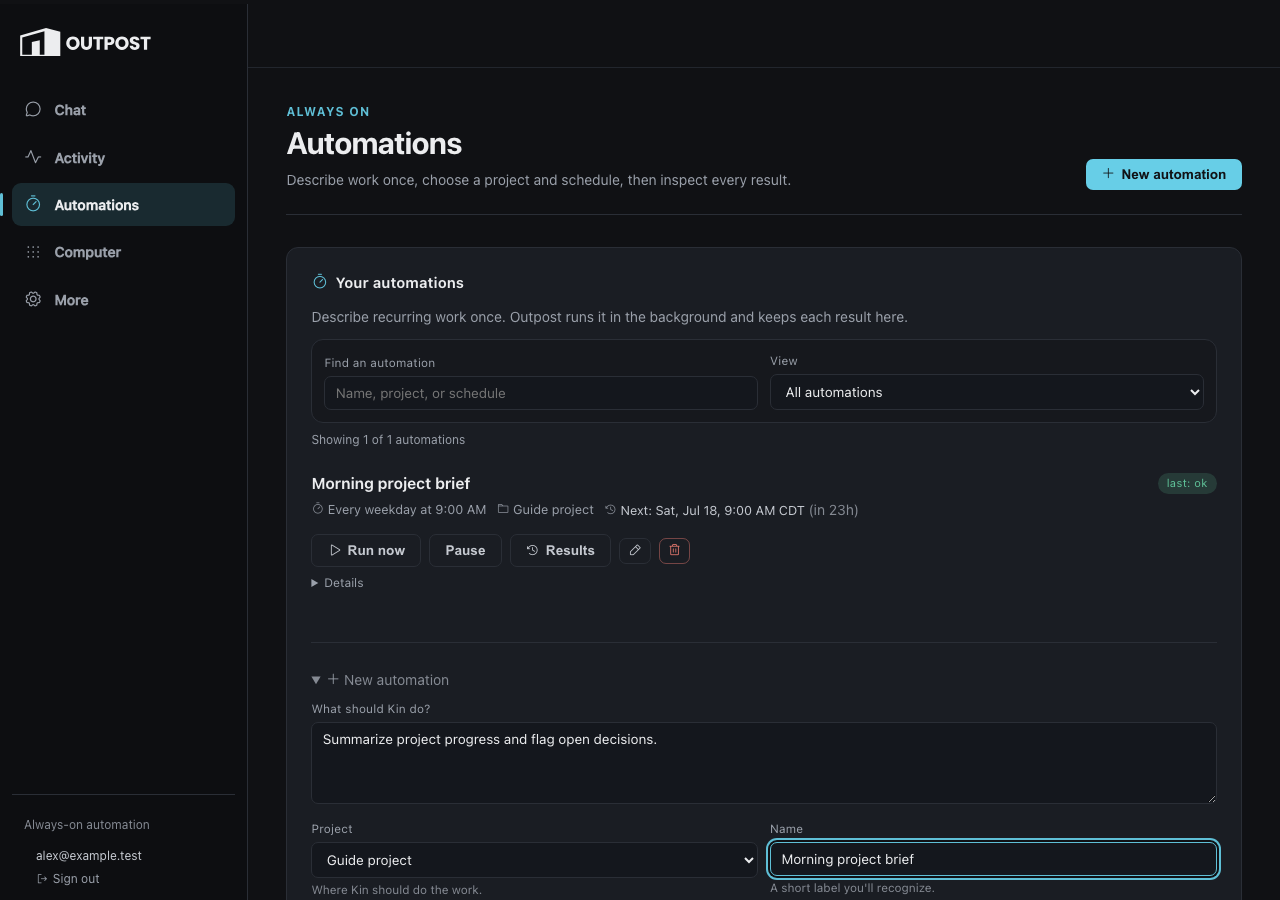
The ordinary form leads with work, project, schedule, and name. Execution limits remain available under advanced options.
Choose the schedule
| Choice | Use it for | Stored shape |
|---|---|---|
| Interval | Every N minutes, hours, or days | every |
| Daily / weekly / weekdays | Familiar local wall-clock schedules | cron |
| One time | A single future run | at |
The browser timezone is the default and the preview uses the same computation as the saved schedule. Advanced options expose mode, timeout, retries, token budget, provider pin, and raw cron when the ordinary choices are not enough.
Inspect and recover
Each automation row shows enabled/paused state, next occurrence, last outcome, and actions:
- Run now creates an immediate run without changing the schedule.
- Pause prevents future fires without deleting history.
- Results opens Activity filtered to this automation.
- Edit reopens the same form and preserves untouched advanced values.
- Re-pin deliberately adopts a newly served model after provider drift.
Unattended execution is deliberately bounded. A run is single-flight; missed times coalesce; retries stop; timeouts kill the whole child process group; and repeated failures disable the automation with a visible reason. A question for you becomes a halted needs you result rather than an infinite retry. Its answer can continue only that still-current halt. Stopping the run first permanently retires the item and any unspent approval while preserving the history; a stale answer cannot restart it. A cancelled one-shot is permanent: create a new job for a fresh attempt rather than re-enabling the old identity.
Recipes
A recipe is a visible starting point for a useful automation. Choosing one prefills the prompt and schedule; review and edit them before enabling. The created automation retains the recipe id/version so Outpost can show when the catalogue has changed without silently rewriting your saved prompt.
Alternative methods
Run now
Use an automation’s Run now action when the saved prompt/project are right but you do not want to wait for the next occurrence.
Recipe
Start from the gallery, inspect the resulting prompt and schedule, then enable it. Recipes are templates, not hidden behavior.
Machine door
External systems can submit bounded jobs through Outpost v1. Use the protocol; do not reproduce browser CSRF routes in an integration.
Troubleshooting
- The time is wrong: check the displayed IANA timezone and preview before saving.
- A run was skipped for drift: the concrete served model changed. Review it, then use Re-pin if the change is intentional.
- The automation disabled itself: fix the visible repeated-failure reason, then re-enable; this resets the consecutive-failure count.
- A run says needs you: open the Activity item and answer it. Human gates are not retried automatically.
- Interactive Kin feels slow: the operator can tune Outpost’s background governor; see the maintainer reference below.
Reference
Forwarded technical anchors
The prior all-in-one page’s implementation sections remain available for existing links.
Exact schedule contract
See Automation operations: Exact schedule contract.
What a fire actually runs
See Automation operations: What a fire actually runs.
The provider pin — fail closed on model drift
See Automation operations: Provider pin.
The governor — cross-run GPU fairness
The name preserves the original vLLM-era anchor; current DS4 operation is provider-independent background admission. See Automation operations: Governor.
Reliability semantics
See Automation operations: Reliability semantics.
API surface
See Automation operations: API surface.
Recipes — reusable starting points in Automations
See Automation operations: Recipes.