.%20--%3e%3csvg%20xmlns='http://www.w3.org/2000/svg'%20viewBox='0%200%201610%20300'%3e%3cdefs%3e%3clinearGradient%20id='kb'%20x1='0'%20y1='0'%20x2='0'%20y2='300'%20gradientUnits='userSpaceOnUse'%3e%3cstop%20offset='0'%20stop-color='%2373c6e5'/%3e%3cstop%20offset='.25'%20stop-color='%2352b5dc'/%3e%3cstop%20offset='.5'%20stop-color='%233a9fc8'/%3e%3cstop%20offset='.75'%20stop-color='%232b82ae'/%3e%3cstop%20offset='1'%20stop-color='%231a6490'/%3e%3c/linearGradient%3e%3c/defs%3e%3cg%20fill='url(%23kb)'%20fill-rule='evenodd'%3e%3cpath%20d='M0%20300V0H86V136H160V0H246V164H166V219H246V300H160V219H86V300Z'/%3e%3cpath%20d='M401%2083H321V0H567V83H487V219H567V300H321V219H401Z'/%3e%3cpath%20d='M642%20300V0H728V83H808V136H882V0H968V300H882V219H802V164H728V300Z'/%3e%3cpath%20d='M1043%20300V0H1289V164H1209V219H1289V300H1203V219H1129V300ZM1129%2083V136H1203V83Z'/%3e%3cpath%20d='M1364%20300V83H1444V0H1610V300H1524V219H1450V300ZM1450%2083V136H1524V83Z'/%3e%3c/g%3e%3c/svg%3e)
Kin / Outpost
Rig
Rig is Kin's persistent computer: a browser and isolated shell beside Outpost. Use it for interactive sites that ordinary fetch tools cannot handle, while keeping logins and visual control available to a human.
Read as MarkdownRig is Kin’s persistent computer: a browser and isolated shell beside Outpost. Use it for interactive sites that ordinary fetch tools cannot handle, while keeping logins and visual control available to a human.
Outcome
Ask Kin to complete a bounded browser task, inspect what Rig is doing from Outpost, take over for a login without exposing credentials, and return control.
Fast path
- Ask Kin for a specific web outcome and name the site or starting URL.
- Let the
rigsubagent navigate by roles and accessible names. - Open Outpost Computer to see status and recent semantic actions.
- Choose Load glance only when a visual check is useful.
- Choose Open Rig when a login, captcha, 2FA, or direct control is needed.
- Take control, enter the credential yourself, then release or close the view so model actions can continue.
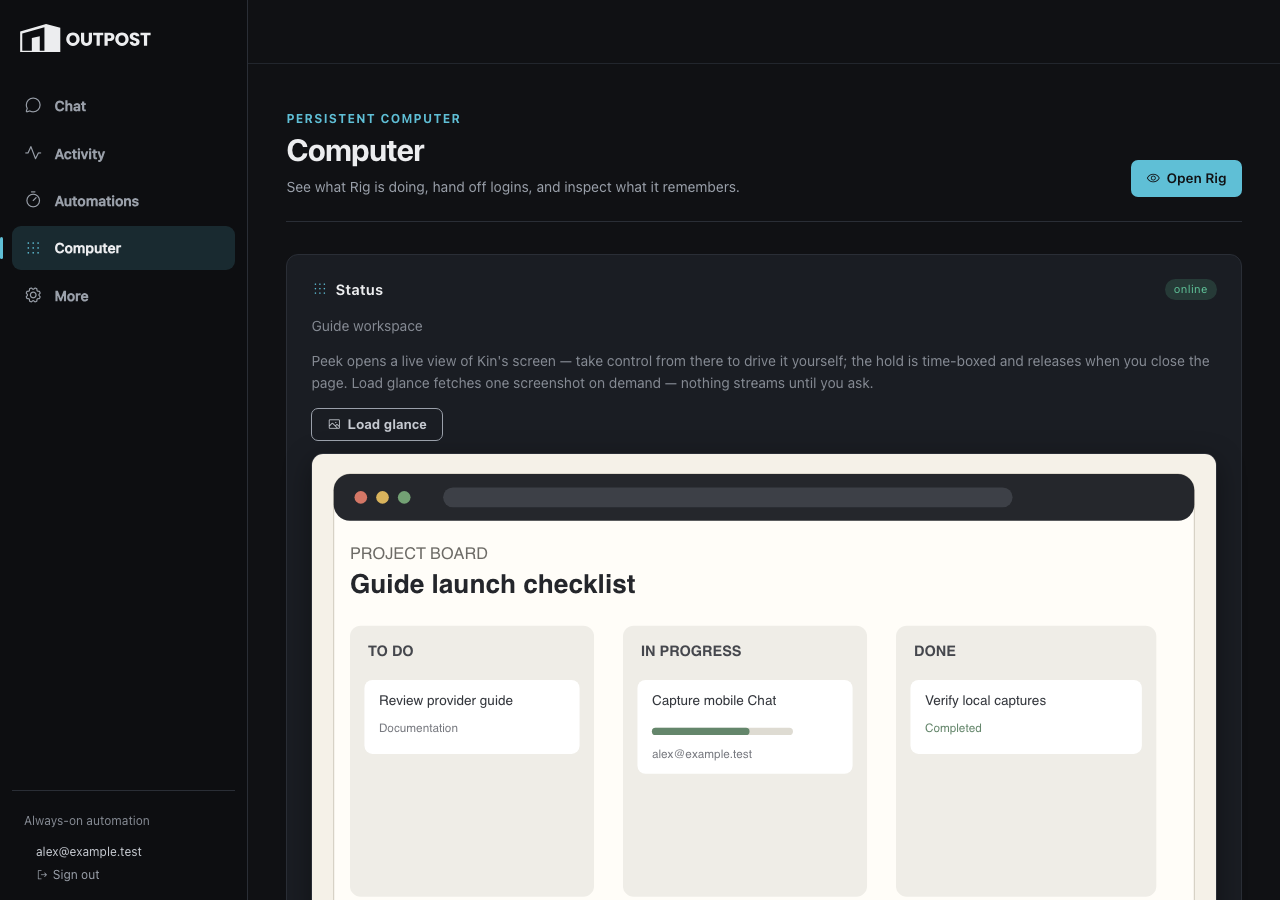
Glance is click-to-load rather than an ambient screenshot stream. The desktop rail also keeps the verified account and Sign out visible.
What Kin can do
Kin normally reads compact semantic snapshots and acts by role and accessible name. The main browser actions navigate, snapshot, click, fill, select, press, scroll, manage tabs, take an on-demand screenshot, and reset browser runtime state. Desktop actions use the same tool for accessible applications.
For a contained multi-step trip, the bundled rig subagent keeps raw
snapshots in its child context and returns a distilled result. It records
durable machine-specific discoveries in Rig memory before finishing.
The separate rig_shell runs bounded commands in Rig’s persistent shell
workspace. Shell networking is disabled by default, and the shell identity
cannot read the Chromium profile or service secrets.
Credentials and human control
Never send a password through the model’s fill or shell tools. An unknown password field is refused before typing. Open Rig provides the intended SSO-gated human path:
- the view starts read-only;
- Take control creates a time-bounded human hold;
- model browser/desktop/shell mutations wait while that hold is active;
- closing the connection releases the hold, with a TTL as crash backstop.
Password text never enters the model transcript or action journal. The browser never receives Rig’s bearer or hold-renewal token; Outpost keeps both server-side.
Persistence and observation
The browser profile, tabs, downloads, shell workspace, action journal, and Rig memory survive ordinary Kin sessions and service restarts. Computer shows health, login attention, recent redacted actions, semantic replay, and bounded memory search.
Screenshots remain explicit. Semantic snapshots are the normal transport; request a screenshot or set-of-marks only when spatial information materially helps.
Alternative methods
Direct tool
Kin can call rig, rig_shell, or rig_memory directly for a short,
already-bounded action.
Rig subagent
Prefer the rig profile for a multi-step excursion. It isolates raw page
state and returns one distilled answer.
Web tools
Use web_fetch, web_search, or web_context when JavaScript, persistent
login, and visual interaction are not required. They are cheaper and
simpler than a persistent computer.
Troubleshooting
- Rig says a human is driving: release or close the Outpost control view; the hold also expires automatically.
- A password fill is refused: use Open Rig and type it directly.
- Glance is empty: check Rig status first, then explicitly load it again.
- A page is unreachable: production Rig refuses private, loopback, link-local, metadata, compose, and tailnet destinations.
- The tools are absent: Rig must be enabled with a valid global URL and token; project files cannot supply that credential-bearing endpoint.
Reference
Forwarded technical anchors
Tools
Configuration
See Rig operations: Configuration.
Browser actions
See Rig operations: Browser actions.
Desktop actions
See Rig operations: Desktop actions.
Peek from Outpost
See Rig operations: Peek from Outpost.