.%20--%3e%3csvg%20xmlns='http://www.w3.org/2000/svg'%20viewBox='0%200%201610%20300'%3e%3cdefs%3e%3clinearGradient%20id='kb'%20x1='0'%20y1='0'%20x2='0'%20y2='300'%20gradientUnits='userSpaceOnUse'%3e%3cstop%20offset='0'%20stop-color='%2373c6e5'/%3e%3cstop%20offset='.25'%20stop-color='%2352b5dc'/%3e%3cstop%20offset='.5'%20stop-color='%233a9fc8'/%3e%3cstop%20offset='.75'%20stop-color='%232b82ae'/%3e%3cstop%20offset='1'%20stop-color='%231a6490'/%3e%3c/linearGradient%3e%3c/defs%3e%3cg%20fill='url(%23kb)'%20fill-rule='evenodd'%3e%3cpath%20d='M0%20300V0H86V136H160V0H246V164H166V219H246V300H160V219H86V300Z'/%3e%3cpath%20d='M401%2083H321V0H567V83H487V219H567V300H321V219H401Z'/%3e%3cpath%20d='M642%20300V0H728V83H808V136H882V0H968V300H882V219H802V164H728V300Z'/%3e%3cpath%20d='M1043%20300V0H1289V164H1209V219H1289V300H1203V219H1129V300ZM1129%2083V136H1203V83Z'/%3e%3cpath%20d='M1364%20300V83H1444V0H1610V300H1524V219H1450V300ZM1450%2083V136H1524V83Z'/%3e%3c/g%3e%3c/svg%3e)
Kin / Use Kin
MCP servers
The Model Context Protocol (MCP) lets you connect external tool servers to kin. Their tools appear in the registry alongside the built-ins, gated by the same permission system.
Read as MarkdownThe Model Context Protocol (MCP) lets you connect external tool servers to kin. Their tools appear in the registry alongside the built-ins, gated by the same permission system.
Outcome
Add an MCP server, review what will start, and make its tools available to the current session without exposing resolved secrets in the UI.
Fast path
- Run
/mcp. - Choose Add server… and select project or global scope.
- Enter the stdio command or HTTP URL; use
${VAR}for secret values. - Save and apply.
- Approve the server’s launch or endpoint identity.
- Confirm the server is enabled and connected in the manager.
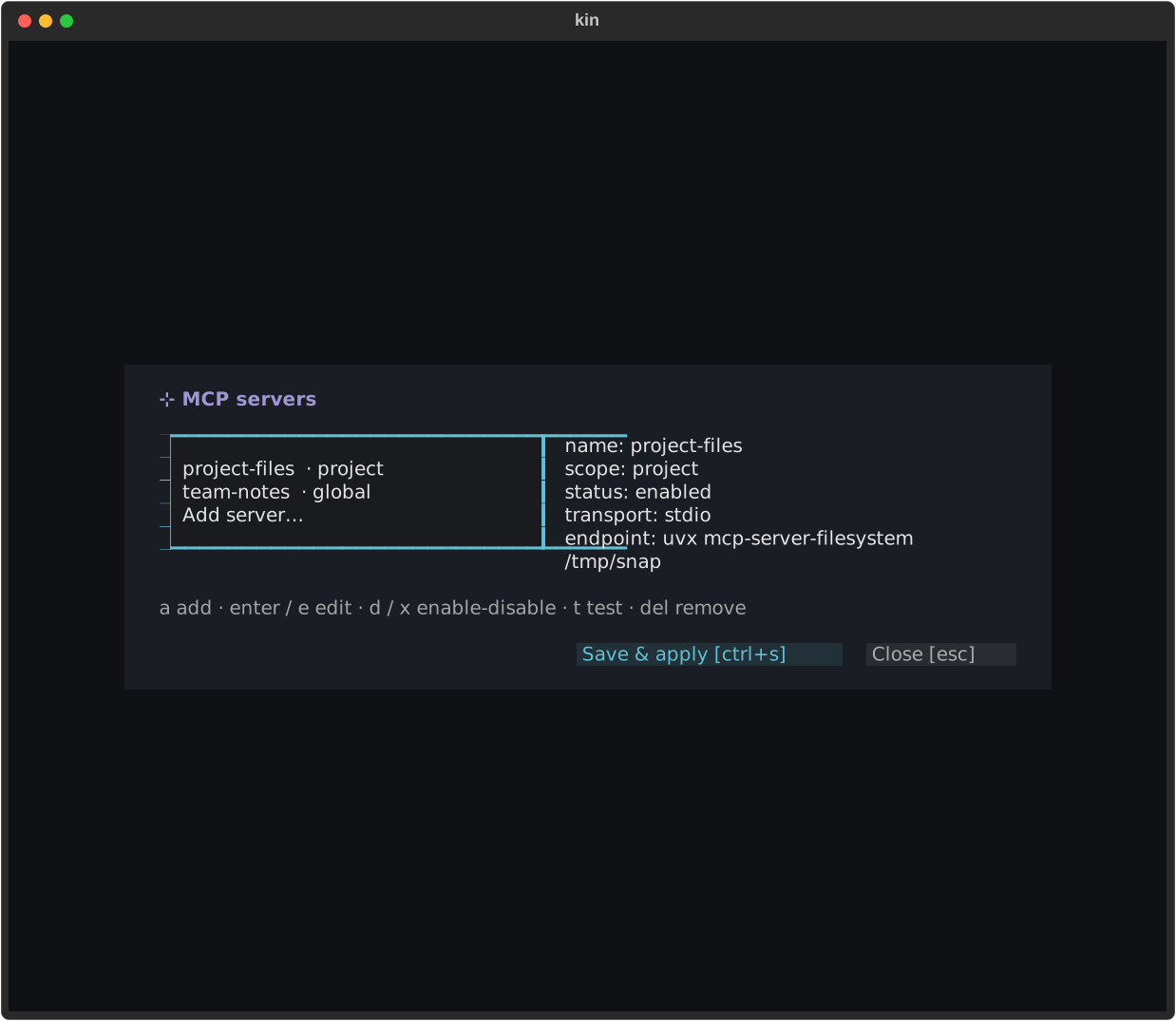
The manager owns quick add, toggle, and apply tasks. Resolved credentials stay masked, and a changed launch identity asks again.
Configuring servers
kin reads MCP servers from an mcp.json file. Two locations are checked, and a
project entry wins on a name clash:
<workdir>/.kin/mcp.json~/.kin/mcp.json
A root <workdir>/.mcp.json is not read: that spelling is the file other
harnesses (Claude Code, codex, …) load and write, so kin treats it as theirs —
auto-loading it would execute foreign configuration, the posture kin already
rejects for .claude/skills. When one exists, kin points at it in a launch
note and the /mcp manager lists its servers as
foreign (not loaded) rows you can adopt explicitly.
The shape follows the cross-tool mcpServers convention:
{
  "mcpServers": {
    "files": {
      "command": "npx",
      "args": ["-y", "@modelcontextprotocol/server-filesystem", "/data"]
    },
    "api": {
      "type": "http",
      "url": "https://example.com/mcp",
      "headers": { "Authorization": "Bearer ${MY_TOKEN}" }
    }
  }
}| Field | Notes |
|---|---|
type |
stdio (default when command is set), http / streamable-http, or sse. sse is parsed but never connected — it’s warned as deprecated and skipped in favor of http; ws is skipped outright (not in the spec) |
command / args |
The process to spawn for an stdio server |
url / headers |
The endpoint and headers for an http server |
env |
Extra environment variables, merged over the SDK’s safe baseline — never your full environment |
timeout |
Per-tool execution timeout in milliseconds |
disabled |
true turns a server off without deleting it — it’s skipped on load (the /mcp manager toggles this) |
allowed_tools |
A per-server capability allowlist (also accepted as allowedTools). When present, only the listed tool names may register — anything else the server exposes is skipped with a warning, including tools it tries to add later via tools/list_changed. Fail-closed: an empty list exposes nothing |
auth |
"oauth" opts an http server into the OAuth 2.1 sign-in flow — see OAuth for remote servers |
oauth |
Optional parameters for that flow: clientId, callbackHost, callbackPort, scopes (snake_case spellings also accepted). Present on an http server, it implies auth: "oauth". Needed by providers that don’t register clients dynamically — see Providers that need a registered client |
Values support ${VAR} and ${VAR:-default} expansion, so secrets stay in
your environment rather than in the file. Malformed entries are skipped with a
warning rather than failing the launch. Both stdio and http /
streamable-http are fully supported live transports (including
OAuth on the http side); sse and ws are not.
Connecting & trust
A server’s command is spawned only after you approve it. On first run kin shows
the approval modal with the server’s transport and command; choose allow-once or
allow-always. “Always” persists the grant to ~/.kin/mcp_trust.json, so the
server connects silently on later launches.
The grant is keyed by the server name and a hash of its launch-affecting
fields (command, args, url, env). If any of those change, the key no longer
matches and kin re-prompts — a rug-pull defense, so a server can’t quietly swap
in a different command or env after you’ve trusted it. A cloned repo’s poisoned
.kin/mcp.json therefore can’t execute anything on launch without your
approval (and a cloned repo’s root .mcp.json is never loaded at all).
Namespacing
Each server’s tools are flattened into the registry namespaced as
mcp__<server>__<tool> — for example mcp__files__read_file. (A name that would
exceed the 64-character tool-name limit is truncated with a short hash suffix so
two long names can’t collide.) Tool descriptions are sanitized before the model
sees them: zero-width and bidi control characters are stripped, the text is
length-capped, and injected-override phrasing is flagged — defenses against tool
poisoning.
Permissions
MCP tools ask for approval by default (they carry the MCP risk kind, so the
gate prompts on each first use). A tool is auto-allowed as read-only only when its
approved server declares readOnlyHint for it in the server’s initial tool list.
A tool that appears later via a tools/list_changed notification is always
treated as unapproved and re-vetted on first call, even if it claims to be
read-only — so a server can’t slip in a “read-only” tool to dodge the gate.
Every MCP tool result is wrapped in untrusted-content framing before it enters the conversation, since server output is attacker-influenceable. See Modes & permissions for the gate, and Tools for how tools surface.
An “always allow” grant on an MCP tool is scoped to that tool’s name only,
kept deliberately separate from shell-command grants — an MCP tool that
declares a command parameter can never piggyback on (or feed) a standing
shell grant.
If a server redefines a tool mid-session (same name, changed description,
schema, or read-only hint), kin treats it as a rug-pull signal, not routine
churn: a ⚠ system note and a warning toast name the redefined tools, any
standing “always allow” grant for those names is revoked, and the tool must be
approved again on its next use. kin also compares the running mcp SDK
version against the one this build was vetted with and warns loudly on drift
(a supply-chain posture: a stale or unexpectedly-upgraded SDK should be
re-vetted, not silently trusted).
Elicitation
An MCP server can ask you for input mid-call (the spec’s
elicitation/create). kin bridges each request onto the same question modal
the ask tool uses — one prompt per schema field, with the header naming
which server is asking. Enum fields become option lists, booleans become
Yes/No, free-form fields take typed text; press ++escape++ at any point to
decline the whole request (nothing partial is ever sent). Requests whose
schema falls outside the spec’s flat-primitives subset are declined
automatically, and kin never auto-answers: in a headless run
an elicitation is recorded as needs-human (exit 2) and declined.
URL-mode elicitation (the newer spec revision, used for sensitive out-of-band flows like sign-ins) shows you the full URL and asks for consent — kin never opens or fetches the URL itself; you visit it out of band if you choose.
Resources
When a connected server declares the resources capability, kin registers two
read-only tools: list_mcp_resources (enumerate URIs, optionally per server)
and read_mcp_resource (fetch one by URI). Both are read kind — resources
are read-only by protocol and the server already cleared the first-run
approval gate — and everything they return is wrapped in untrusted-content
framing, with binary content summarized rather than decoded and long text
truncated.
OAuth for remote servers
Set "auth": "oauth" on an http server to authenticate with OAuth 2.1
instead of a static header:
{
  "mcpServers": {
    "notion": { "type": "http", "url": "https://mcp.notion.com/mcp", "auth": "oauth" }
  }
}
On first connect kin runs the MCP authorization flow — discovery, dynamic
client registration where offered, then authorization code + PKCE with a
one-shot loopback callback on 127.0.0.1. The sign-in URL is posted to the
transcript and a browser open is attempted; finish the consent screen and the
connect completes (first-time OAuth connects get a 300 s handshake budget).
Tokens (and the client info) persist under ~/.kin/mcp_auth/ in 0600 files,
so later launches reconnect silently via the stored/refreshed token — the token
itself never appears in the transcript, journal, or /mcp status (which shows
the auth mode and, when set, the public client id and loopback redirect).
Stored state is keyed by the endpoint identity: the URL plus the server’s non-secret headers. Services that serve many tenants from one URL and select between them with headers therefore get one token file each, and rotating a bearer header never strands an OAuth token.
Auth-code + PKCE is the flow the MCP spec and the hosted-server ecosystem
actually support (device flow appears in no spec revision and no major hosted
server). On a box with no reachable browser — Outpost, a bare SSH host —
prefer a PAT/bearer token in headers ("Authorization": "Bearer ${MY_PAT}"),
which GitHub, Linear, Atlassian and Stripe all document for exactly this case.
Providers that need a registered client
Some authorization servers don’t implement dynamic client registration, and
match the redirect URI exactly. Microsoft Entra ID is the common one. For those,
an administrator registers an application once and you name it in the oauth
block:
| Key | Notes |
|---|---|
clientId |
The pre-registered application id. Supports ${VAR}. Without it kin attempts dynamic registration, which such providers reject |
callbackPort |
The fixed loopback port in the registered redirect URI. Omitted, kin uses an ephemeral port, which only works where any port is accepted |
callbackHost |
127.0.0.1 (default) or localhost. Use whichever spelling the redirect URI was registered with; localhost requires callbackPort and binds both IPv4 and IPv6 |
scopes |
Exact scopes to request, replacing the ones the server advertises. Use this when the advertised set is missing something you need — most often offline_access, without which the provider issues no refresh token and every launch re-opens the browser |
Only loopback hosts are accepted: the authorization code is a credential, and a non-loopback redirect would hand it to another machine.
Example: Dynamics 365 Business Central
Business Central serves every tenant from one URL and selects the environment
with headers. Register an application in the Microsoft Entra admin
center — multi-tenant, a Mobile and desktop
applications redirect URI of http://localhost:33418/callback, delegated
Dynamics 365 Business Central → Financials.ReadWrite.All, admin-consented —
then:
{
  "mcpServers": {
    "businesscentral": {
      "type": "http",
      "url": "https://mcp.businesscentral.dynamics.com",
      "headers": {
        "TenantId": "${BC_TENANT_ID}",
        "EnvironmentName": "Production",
        "Company": "CRONUS USA, Inc."
      },
      "auth": "oauth",
      "oauth": {
        "clientId": "${BC_MCP_CLIENT_ID}",
        "callbackHost": "localhost",
        "callbackPort": 33418,
        "scopes": [
          "https://mcp.businesscentral.dynamics.com/Financials.ReadWrite.All",
          "offline_access"
        ]
      }
    }
  }
}
The port here must match the registered redirect URI. A Company or
ConfigurationName containing non-ASCII characters has to be sent Base64-encoded
in the =?base64?…?= form the provider documents. Microsoft’s own
setup guide for non-Microsoft hosts
covers the registration steps in full. The server exposes read-only access to
its API pages by default; write operations are enabled administratively on the
Business Central side, not here.
Managing servers
Run /mcp to open the interactive server manager. The left pane lists every
configured server (and an “Add server…” row); the right pane shows the selected
server’s details with secrets redacted — the endpoint with query tokens and
credentials stripped, and http headers with secret values masked (Bearer ●●●●,
never the token). Resolved secrets are never shown.
If the workspace has a foreign root .mcp.json, its servers appear as
foreign (not loaded) rows. enter on one adopts it: the raw spec
(unexpanded ${VAR} spellings and all) is copied into the project scope, so
saving writes it to .kin/mcp.json. The foreign file itself is never modified,
and an adopted server still goes through the ordinary first-run approval on
connect — adoption moves config, never trust. Every other key on a foreign row
asks you to adopt first.
Keys in the manager:
| Key | Action |
|---|---|
a |
Add a server (opens a form: name, scope, transport, command/args/env or url/headers) |
enter / e |
Edit the selected server (on a foreign row, enter adopts it into the project scope) |
d / x |
Enable / disable the selected server (flips its disabled field) |
t |
Test — a live connect isn’t run from the modal (that must stay on the one MCP lifecycle task); save + apply instead, and watch for the connect note |
delete |
Remove the selected server (confirms first) |
ctrl+s |
Save & apply — writes the changed mcp.json file(s) and reconnects live |
esc |
Cancel (discards changes) |
For larger edits, /edit-mcp [instruction] lets kin draft the whole
.kin/mcp.json for you and shows a diff to approve — see
Editing config artifacts. The
manager (/mcp) is the quick toggle/add path; /edit-mcp is the
draft-from-a-description path. Both reconnect live on apply.
On save, kin writes each touched scope’s file (<workdir>/.kin/mcp.json or
~/.kin/mcp.json) and reconnects the MCP servers live — no restart. The
reconnect re-checks approvals (an unchanged server you’ve trusted reconnects
silently; a changed command re-prompts).
/reload re-reads both mcp.json scopes plus settings.toml and applies them live
(reconnecting MCP and, if the wire changed, swapping the backend). It’s refused
while a turn is running.
Revoke a standing trust grant with /grants (which also clears the persistent
trust entry); see Slash commands. To put MCP server config
in a TOML settings file context, see
Settings (TOML).
Adding servers from the Outpost Dashboard
The Outpost Dashboard offers a second, host-level surface for the
global ~/.kin/mcp.json — useful when you want every workspace’s sessions
on the box to adopt the same server without opening /mcp in each one. The
MCP Servers card lists configured servers (name, transport, masked
endpoint, enabled/disabled), with an enable/disable toggle and a delete
button per row, plus an “Add server” form: paste the same mcpServers entry
shape shown above (one server’s JSON snippet, copied straight from its
README) and save. Every read goes through the same safe_endpoint /
masked_headers redaction described above — a resolved ${VAR} secret never
reaches the browser — and every write persists the raw, unexpanded snippet,
never a secret-resolved copy. It complements, not replaces, the in-TUI /mcp
manager (which is project-scoped and live-reconnects); a server added or
toggled from the dashboard takes effect for sessions started after the
change — an already-open terminal needs a restart to pick it up.
Troubleshooting
- A trusted server asks again: its command, arguments, URL, or environment changed, so the stored identity hash no longer matches.
- A server you put in
.mcp.jsonnever appears: kin reads.kin/mcp.json, not the root.mcp.json(the root spelling is the cross-tool convention — other harnesses write it, and so did kin itself before the.kin/move). Open/mcpand adopt theforeign (not loaded)row, or move the entry yourself. - A tool is missing: check
disabled,allowed_tools, and whether a late-added or redefined tool is waiting for fresh approval. - OAuth cannot complete on a remote host: use the provider’s documented PAT/bearer header path or complete the flow where the loopback callback is reachable.
- Sign-in fails on a redirect URI mismatch (Entra reports
AADSTS50011): theoauth.callbackPortandcallbackHostmust render exactly the redirect URI registered with the provider./mcpshows what kin will send. - Client registration is rejected or 404s: the provider doesn’t support
dynamic registration — set
oauth.clientIdto a registered application id. - You are asked to sign in every launch: the provider issued no refresh
token. Add the scope that grants one (
offline_accessfor Entra) tooauth.scopes. - The callback port is already in use: free it, or change
callbackPortand the registered redirect URI together. - A removed
clientIdis still being used: client info persists per endpoint. Delete that endpoint’s file under~/.kin/mcp_auth/to start the flow over from registration. - An edit did not take effect: use Save & apply in
/mcp; dashboard changes affect newly started sessions.