# Modes & permissions
> How kin decides whether a tool call runs, asks, or is refused — and how you steer that with modes and per-session grants.
How `kin` decides whether a tool call runs, asks, or is refused — and how you steer that with modes and per-session grants.
## Outcome
Choose a calm default posture, understand exactly why an action asks, and
approve or deny it without granting broader authority than intended.
## Fast path
1. Start in `auto` for workspace-confined edits and sandboxed shell.
2. Press ++shift+tab++ when you want the ask-first `strict` posture.
3. Read the approval title and native command/diff body.
4. Choose **Allow once** for this call, **Always** for the displayed session
scope, or **Deny**.
5. Use **Deny with a note** when Kin should try a different approach.
6. Run `/grants` to inspect or revoke remembered session approvals.
Permission is a property of the **tool**, not just the mode. Every tool declares
a risk `kind`; the active mode maps each kind to a decision.
## The two modes
There are two cyclable modes, and ++shift+tab++ toggles between them:
| Mode | What it allows |
|---|---|
| `auto` | **The default.** Safe autonomy: workspace-confined edits and bounded first-party publication run without asking, and shell runs under an OS sandbox instead of prompting. MCP tools still ask. See [Auto mode & the OS sandbox](/docs/kin/guide/auto-mode-and-sandbox/). |
| `strict` | The review posture: read and search freely; stop and ask before a file edit or an MCP tool; auto-allow provably read-only shell, ask for the rest. |
`auto` is the launch default and the more autonomous tier; `strict` is the calm, ask-first posture. The cycle is a 2-way toggle, `auto ↔ strict`.
> **Planning is no longer a mode + legacy aliases**
>
> Earlier versions had `accept-edits` and `plan` modes and a four-way cycle. Those are gone: `accept-edits` folded into `auto`, and planning became a transient **freeze** you enter by dispatching a `planner` subagent (or with `/plan`) rather than a mode you cycle to (see [Planning](#planning)). The legacy names are still accepted on the CLI, in `settings.toml`, and in a resumed journal — they alias onto the new pair (`default → strict`, `accept-edits → auto`, `plan → strict`) with a deprecation note. **This is the canonical home for the legacy alias map** — every other doc links here.
## Tools × decisions
Each mode maps a tool's `kind` to one of: **allow** (run, no prompt), **ask** (park on an approval modal), **deny** (soft-refuse with a result the model reads and moves on), **auto** (shell only: classify the command — provably read-only runs, else ask), or **sandbox** (shell only, in `auto`: run under the OS sandbox).
| Tool kind | Examples | `auto` | `strict` |
|---|---|---|---|
| `read` | `read_file`, `grep`, `glob`, `ls`, `web_*` | allow | allow |
| `meta` | `todos`, `ask`, `task`, `skill`, `shell_list/output/kill` | allow | allow |
| `edit` | `write_file`, `edit_file`, `edit_notebook` | allow | ask |
| `shell` | `shell`, `run_code` | sandbox | auto |
| `mcp` | external MCP tools, `outpost-send`; Beam-only `git-push`/`git-pull` | ask | ask |
| `network` | `git.fetch`/`sync` (`update` alias), GitHub PR reads, Beam-only `git-fetch` | allow | ask |
| `publish` | normal `git.push`, `github.open_pr` | allow | ask |
| `browser` | `browser` | allow | ask |
| `outpost` | `outpost` | allow | ask |
MCP tools are arbitrary remote code, so they ask in **both** modes — they are never auto-allowed, not even in `auto`. (A read-only MCP tool from an approved server is adapted as a `read` tool instead, so those do not prompt.) See [MCP](/docs/kin/guide/mcp/). The mutating [`outpost-send` tool](/docs/kin/guide/tools/#outpost) and Beam-only structured push/pull tools reuse the `mcp` kind because those remote mutations always ask and are denied while planning.
The first-party [`git` and `github` tools](/docs/kin/guide/tools/#git-and-github) classify
each concrete operation rather than carrying one static risk kind. Local reads
are `read`; branch/stage/commit operations are `edit`; fetch, fast-forward
sync/update, and PR reads are `network`; normal push and opening a PR are
`publish`. Both `network` and `publish` allow in `auto`, ask in `strict`, and
are denied while planning. This lighter posture is reserved for Kin-owned
schemas with fixed argv and bounded destinations; arbitrary MCP calls still
ask in both modes. A force-with-lease push pins itself to **ask** in both modes,
offers no reusable grant, and is still denied during planning.
Beam's separate structured `git-fetch` also uses `network`; its internal
push/pull checkpoint remains `mcp`. The ordinary and Beam schemas do not share
grants.
The [`browser` tool](/docs/kin/guide/browser/) gets its own `browser` kind with the same allow-in-`auto` / ask-in-`strict` split. It's a *separate* kind from `network` (which is documented as git-fetch-only) because a browser session — remote JavaScript, attacker-controlled pages — is a different risk class whose gate must be tunable independently. The lighter `auto` posture is sound because the tool's own boundary does the heavy lifting: only `http`/`https` URLs are accepted, every top-level navigation is SSRF-checked before the browser sees it, and downloads / dialogs / popups are refused automatically. Like `network`, it is **denied** while planning — a browser action can submit a form, a side effect the read-only freeze must catch.
The read-only [`outpost` tool](/docs/kin/guide/tools/#outpost) similarly gets its own `outpost` kind rather than reusing `network`: it's a read from the model's perspective (list jobs, fetch a report, read the inbox) against a bearer-authed, operator-owned Outpost endpoint, so it gets the same lighter allow-in-`auto` posture—but remote HTTP to an operator service is distinct from Beam's bounded Git transport. It's **denied** while planning too. The mutating half, `outpost-send`, is a *separate* tool with kind `mcp` (see above)—submitting, cancelling, or answering always asks.
While the [planning freeze](#planning) is active, `edit` / `shell` / `mcp` /
`network` / `publish` / `browser` / `outpost` are **denied** as an overlay on
top of whichever mode is active — the underlying `auto`/`strict` policy is
untouched and returns the moment you approve a plan or leave the freeze.
> **Auto edits to protected paths still ask**
>
> Even in `auto`, an edit that targets a path which changes how the agent or its tooling runs — anything under `.git/`, a lockfile (`uv.lock`, `package-lock.json`, …), `.npmrc` / `.yarnrc`, `.kin/mcp.json`, `.mcp.json`, `.claude.json`, a shell rc file, `.pre-commit-config.yaml`, `pyrightconfig.json`, `~/.ssh/config`, or `.kin/settings.toml` itself — is downgraded from auto-allow to **ask**, so it can't silently rewrite repo state, the dependency supply chain, or the harness config. See [Auto mode & the OS sandbox](/docs/kin/guide/auto-mode-and-sandbox/#protected-write-paths).
## The shell allowlist
In `strict` mode, the `shell` kind maps to **auto**: a command is auto-allowed only when it is *provably* read-only, and otherwise falls back to the approval modal. (The [`run_code` interpreter](/docs/kin/guide/tools/#code-interpreter-python) shares the `shell` kind but carries no command string to classify, so it always asks in `strict` — arbitrary code is never provably safe — and runs sandboxed in `auto`.) The classifier is conservative — it only ever downgrades ask to allow for commands it can prove safe, and anything uncertain stays ask. (In `auto` mode, shell maps to **sandbox** instead — the classifier still runs, but a command it can't prove safe runs contained rather than prompting.)
It works in two tiers:
- **Always-safe commands** — read-only regardless of flags (`ls`, `cat`, `grep`, `pwd`, `wc`, `diff`, the `*sum` hashers, and more).
- **Conditional commands** — safe only when a per-command checker passes (`git` read-only subcommands like `status`/`log`/`diff`, `find` without `-exec`/`-delete`, and similar).
A command with command/process substitution, output redirection, or a leading `VAR=value` assignment is never auto-allowed. Set `KIN_SHELL_ALLOWLIST=0` to turn the allowlist off and send every shell command through the approval modal.
> **Note**
>
> The allowlist downgrades a prompt to a run; it is not the security boundary. Containment for un-vetted commands comes from the OS sandbox in `auto` mode — see [Auto mode & the OS sandbox](/docs/kin/guide/auto-mode-and-sandbox/).
## Tri-state approvals
When a tool call asks, the approval modal normally offers three answers:
| Answer | Effect |
|---|---|
| Allow once (`a`, or bare ++enter++ — it's the focused default) | Allow this one call. |
| Always (`s`) | Allow this call and remember it for the rest of the session — the button label names exactly what it will cover (e.g. `Always: \`npm\` commands`). |
| Deny (`d` / ++escape++) | Refuse this call; the model reads the refusal and adapts. |
| Deny with a note (`n`) | Refuse **and steer**: type one line ("use pnpm instead") and enter — the note rides back to the model as the denial reason, so it adapts without a follow-up message. Esc closes the note input first; a second esc denies plain. |
A fresh-state action may deliberately omit **Always**. Force-with-lease is the
canonical example: the user must review every attempt after Kin observes the
current branch and destination; an earlier session signature cannot authorize
it.
The modal shows the call in its **native form** per risk kind: a file edit
renders the actual unified diff it would apply (computed with the same match
path the tool runs — what you approve is what happens); a shell command
renders syntax-highlighted with its timeout/background flags as dim metadata;
network, publish, and MCP calls render labeled argument rows (with a note that MCP
argument schemas come from the external server); anything else falls back to
the raw argument dump. The title names the kind (`file edit · src/x.py`,
`shell command`, `MCP tool · server › name`) and carries an amber accent only
for the riskier kinds (shell / MCP / network / publish / browser) — a plain file edit
reads calm. A bare `edit_file`/`write_file` "always" covers **every** future
edit this session, so those prompts carry an explicit "prefer allow once"
note.
[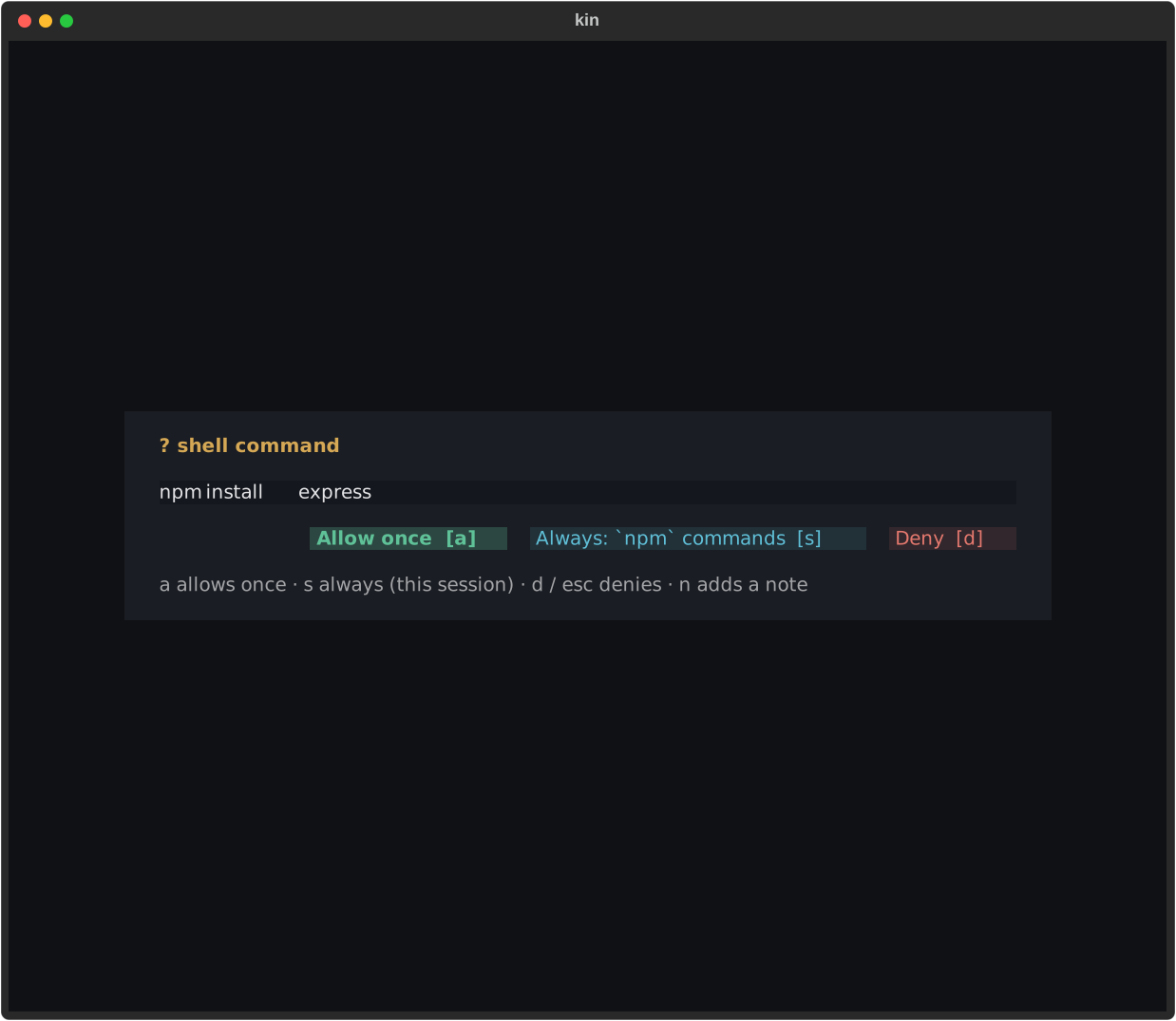](/docs-assets/kin/assets/screenshots/approval_modal.svg)
*The approval body shows the real action; the Always label names the scope it
would remember for this session.*
"Always" remembers a **signature**, not the literal call. A shell command groups
by its command head — approving `npm` once auto-allows later `npm …` calls —
but only for a single command with no substitution or redirect, so approving
one head can never green-light a different command hidden behind a `;` or
`&&`. A compound command is scoped to that exact command string instead.
Ordinary Git/GitHub grants bind the repository, operation, remote, and branch;
GitHub publication grants also bind the base branch.
Beam Git grants bind `remote` + `branch` + that tool's one risky flag. Every
other non-shell tool groups by tool name. The grant only ever turns an ask
into an allow; it never relaxes a deny, so the [planning freeze](#planning)
still refuses mutation and publication.
This tri-state modal governs ordinary mode/tool approvals. A
[`sandbox_permissions` request](/docs/kin/guide/auto-mode-and-sandbox/#scoped-sandbox-access)
uses a separate capability modal because it must let you remove individual
paths/network/SSH authority and choose Once, Session, or Workspace without
turning a command head into a standing sandbox bypass.
## Cycling modes
The mode is a **human-only control** — the model cannot call `set_mode`, so it can never self-escalate its own permissions. You change it three ways:
- ++shift+tab++ toggles between `auto` and `strict`.
- `/mode` with no argument toggles the same 2-way cycle.
- `/mode ` sets a specific mode (`auto` or `strict`; the legacy `default` / `accept-edits` / `plan` are still accepted — see [legacy-mode-aliases](#legacy-mode-aliases)).
The cycle is a 2-way toggle, `auto ↔ strict`. See [Keybindings](/docs/kin/guide/keybindings/) for the full key map.
## Planning
Planning is a transient, read-only **freeze** on the session — not a mode.
While it is active, edits, shell, MCP, network, and publish tools are refused
(an overlay on top of `auto`/`strict`); reads, search, and `todos` still run,
so the model can research and write a plan but cannot act.
There is a deliberate asymmetry: **the model may enter the freeze, but only you can leave it.**
- The model enters planning by dispatching a read-only `planner` subagent (`task(subagent_type='planner', ...)`) when a task needs design before action; the subagent researches read-only and drafts the plan with `write_plan`, whose first call auto-enters the freeze on the top-level session — entering a read-only freeze only *reduces* capability, so it is safe to self-trigger this way.
- You enter or leave it with `/plan`: `/plan ` enters the freeze and sends ``; bare `/plan` toggles the freeze (your escape hatch — ++shift+tab++ no longer controls planning).
- The model presents a finished plan with the `present_plan` tool, which raises an approval modal. Only your choice there (or a bare `/plan`) lifts the freeze.
A `⏸ planning` badge sits in the status bar's left activity group (the mode badge is on the right) while the freeze is active. The freeze propagates to subagents, so a mid-plan `task(...)` stays read-only too. It is never persisted — a resumed session lands in `strict` (edits/shell ask-gated), and the unfinished plan survives as its file under `.kin/plans/`.
When you approve a plan, the modal offers three actions:
| Action | Effect |
|---|---|
| **Approve & execute** | Lift the freeze and carry out the plan with the current (primed) context. The default. |
| **Approve, clear & re-inject** | Drop the planning chatter and reseed history with just the plan plus an execution preamble — best for a large task where the research exploration would otherwise crowd the context. Plans are written for exactly this: the [planner](/docs/kin/concepts/agents/#the-planner-agent) holds them to a self-containment bar (exact files, anchors, constraints, verification) so the plan can serve as the executor's *only* context. |
| **Review plan first (adversarial)** | Sends the plan to a read-only [critic agent](/docs/kin/concepts/agents/#the-critic-agent). Kin can apply bounded targeted findings to the saved plan and re-present it while general file writes remain denied. Stays frozen. |
Pressing ++escape++ keeps planning. The plan is saved under
`/.kin/plans/`, so review can survive a quit. Tool argument and
replacement mechanics are maintainer material in
[REFERENCE.md](https://github.com/kinra-ai/kin/blob/dev/REFERENCE.md); see
[Configuration](/docs/kin/getting-started/configuration/#visible-plans) for the
user-facing file behavior.
## Model-writable settings
The model can help tune your settings mid-conversation through the [`read_settings` / `propose_settings` tools](/docs/kin/guide/tools/#settings) — turn the guidance on with [`/settings`](/docs/kin/guide/slash-commands/#built-in-commands). Every change still goes through a human diff-approval modal (the same gate as `/edit-settings`), and a hard boundary limits what the model can touch. See the [settings.toml reference](/docs/kin/reference/settings-toml/) for what each key does:
| Tier | Keys | The model can… |
|---|---|---|
| **Model-writable** | `temperature`, `top_p`, `top_k`, `max_tokens`, `context_window`, `enable_thinking`, `effort`, `thinking_type`, `cache_ttl`, `model` | …propose a change (you approve a diff). Applies to **new** sessions. |
| **Human-only** | `mode`, `sandbox`, `sandbox_strict`, `sandbox_grants`, `sandbox_always_allow`, `git_host_grants`, `shell_allowlist` (containment/trust); `api_key`, `base_url`, `brave_api_key` (secrets/endpoints); `provider`, `provider_preset`, `providers`, `model_favorites` (presets); `reasoning_effort` (cross-wire conflict — use the wire-agnostic `effort` knob, which the picker translates per-serve; a writable `reasoning_effort` would let the model bypass the picker and write a value the Anthropic wire won't read) | …never. The tool refuses these with a banner naming the key — use `/grants`, `/models`, the key prompts, or hand-edit non-secret settings in `~/.kin/settings.toml`. |
The model-writable set is an **explicit positive allowlist**, not "everything except the secrets" — a knob is denied until it's deliberately added to the list, so a future setting can't silently become model-writable. `propose_settings` is top-level only (a subagent can't propose), is frozen during planning, and never writes secrets or endpoints (the diff masks every credential **and endpoint** value — `api_key`, `base_url`, and any nested `[[providers]]` token — so your private endpoint never rides into model context). Changing the *live* session is still a human-only act: use `/mode` and `/model`. `read_settings` masks all credentials to `[SET]`/`[NOT SET]`.
## Troubleshooting
- **Always did not apply:** remembered grants match the scope printed on the
button. A different command head, repository/branch/remote, tool, server
definition, Git route fingerprint, or Beam target asks again.
- **An edit asks in `auto`:** protected paths such as lockfiles, `.git/`, MCP
config, and Kin settings deliberately keep a human gate.
- **Mode will not change:** planning is a freeze over the active mode. Review
or dismiss the plan flow; ++shift+tab++ does not bypass it.
- **A command was not classified read-only:** uncertainty falls back to asking.
Do not expand the allowlist merely to silence a legitimate prompt.
## Managing grants
`/grants` opens one management surface for ordinary session "always allow"
signatures, session and persistent Git host-route trust, sandbox session
grants, denial-bound exact-operation session bypasses, and typed workspace
grants. Legacy `sandbox_always_allow` patterns also appear, clearly marked
**inactive — reapproval required**; they grant nothing in current Kin. For
scripted or quick use, `/grants revoke ` revokes one directly (and
clears the persistent trust store for an MCP-server grant so it is not silently
re-trusted next launch).
Sandbox revocation is live: Kin stops background shells started with expanded
authority and closes an expanded `run_code` kernel, so a process cannot keep a
capability after its grant disappears. Ordinary, Git-host session, and sandbox
session grants end when Kin closes. Workspace sandbox grants and Git host-route
grants are global human-owned settings; revoking one removes it from future
sessions too.