# Kin
> Kin is a terminal-based AI peer for working in a real project. It can read and change files, run tools, search the workspace, coordinate agents, and keep a durable session. Outpost carries the same working relationshi…
 Kin is a terminal-based AI peer for working in a real project. It can read and
change files, run tools, search the workspace, coordinate agents, and keep a
durable session. Outpost carries the same working relationship into an
always-on browser surface for Chat, scheduled work, and attention.
“Peer” describes an [engineering philosophy](/docs/kin/concepts/ai-peer-philosophy/),
not a claim about sentience: design for understanding and collaboration,
calibrate before blaming the model, and verify every important claim.
## Start here
The shortest path from a checkout to useful work is three page transitions:
1. [Install Kin](/docs/kin/getting-started/install/).
2. [Connect a model and launch](/docs/kin/getting-started/first-run/). The in-app
`/providers` flow is the recommended route.
3. [Send your first message](/docs/kin/getting-started/first-session/).
If Kin is already installed, go straight to
[Connect a model and first run](/docs/kin/getting-started/first-run/). You do not need
to read the reference pages before starting.
[](/docs-assets/kin/assets/screenshots/welcome_banner.svg)
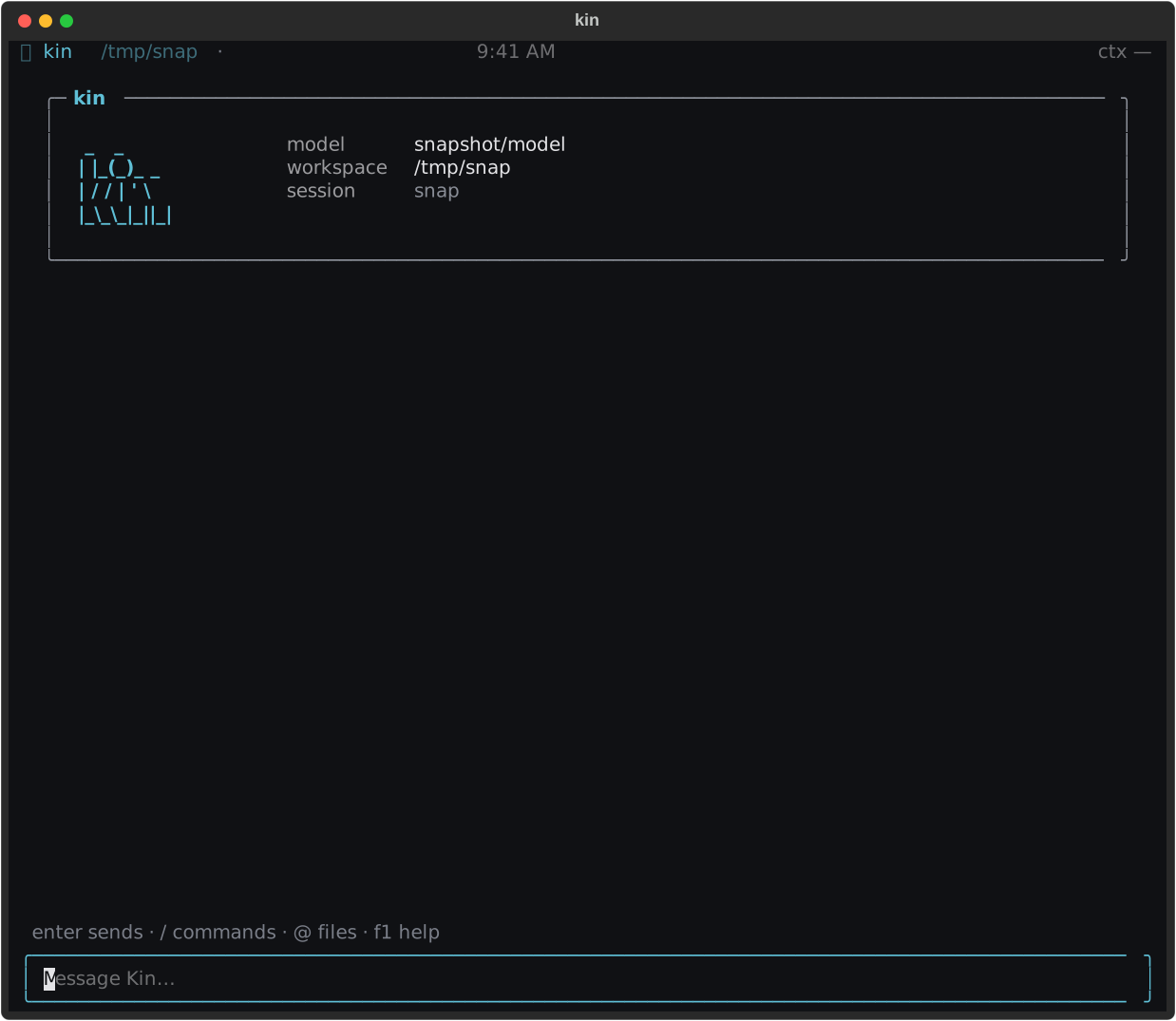
*The welcome screen is the final connection check: confirm the model and
workspace, then send a message.*
## Four everyday paths
### Work with Kin in the terminal
Start with a concrete outcome: “explain this failure,” “change the parser and
test it,” or “find every caller of this function.” Kin streams its answer,
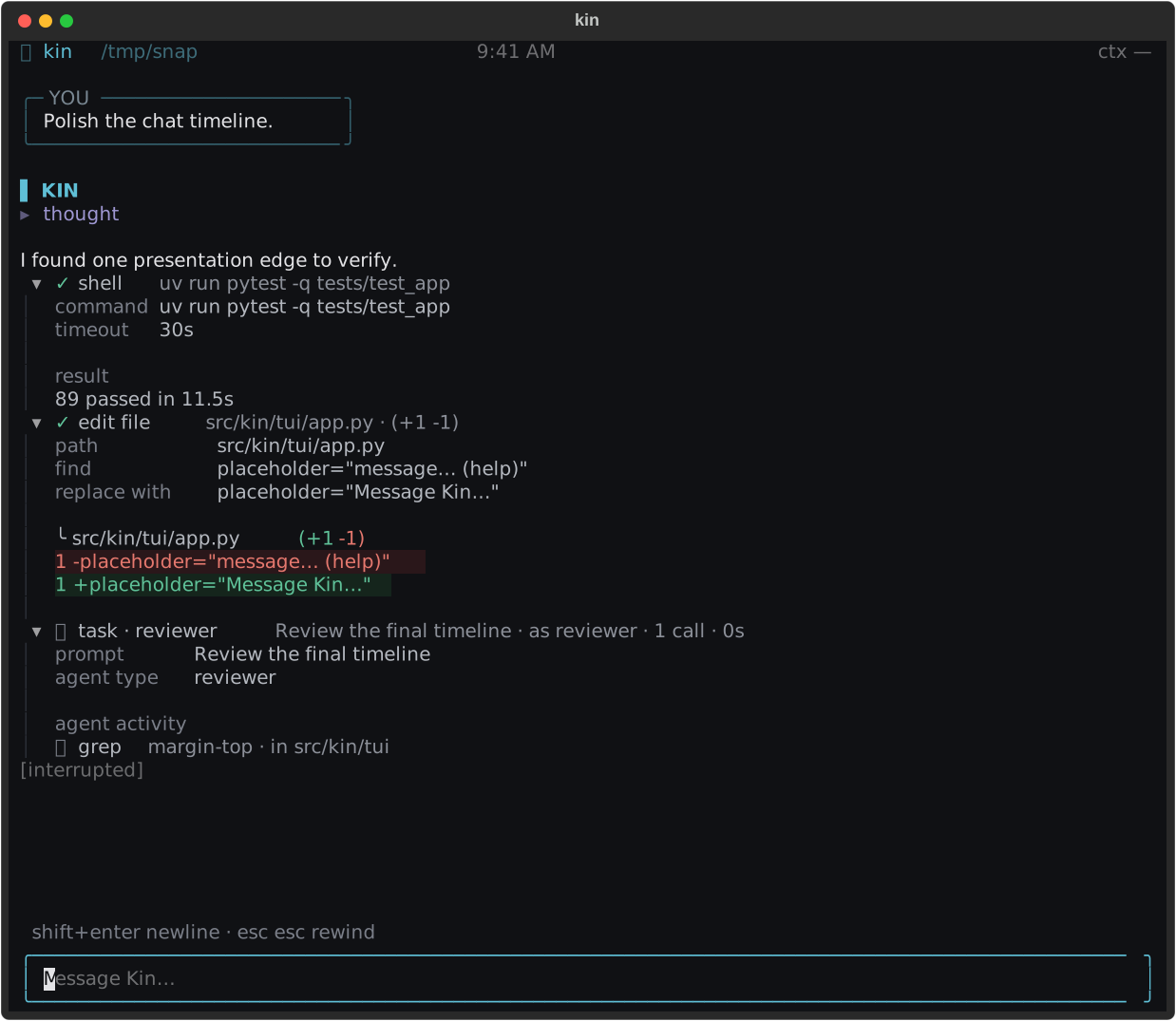
keeps reasoning collapsed, and renders tool calls as a compact work log.
File-writing tools show intentional diffs with one context line and a
`(+N -M)` badge; reads and review output stay collapsed until you ask.
[](/docs-assets/kin/assets/screenshots/timeline_states.svg)
*The timeline distinguishes explanation, reasoning, tool work, edits, and
interruption without turning the transcript into a debug console.*
Continue with [First session](/docs/kin/getting-started/first-session/), then keep
[Files & tools](/docs/kin/guide/tools/), [modes and approvals](/docs/kin/guide/modes-and-permissions/),
and [keybindings](/docs/kin/guide/keybindings/) nearby.
### Create work that runs later
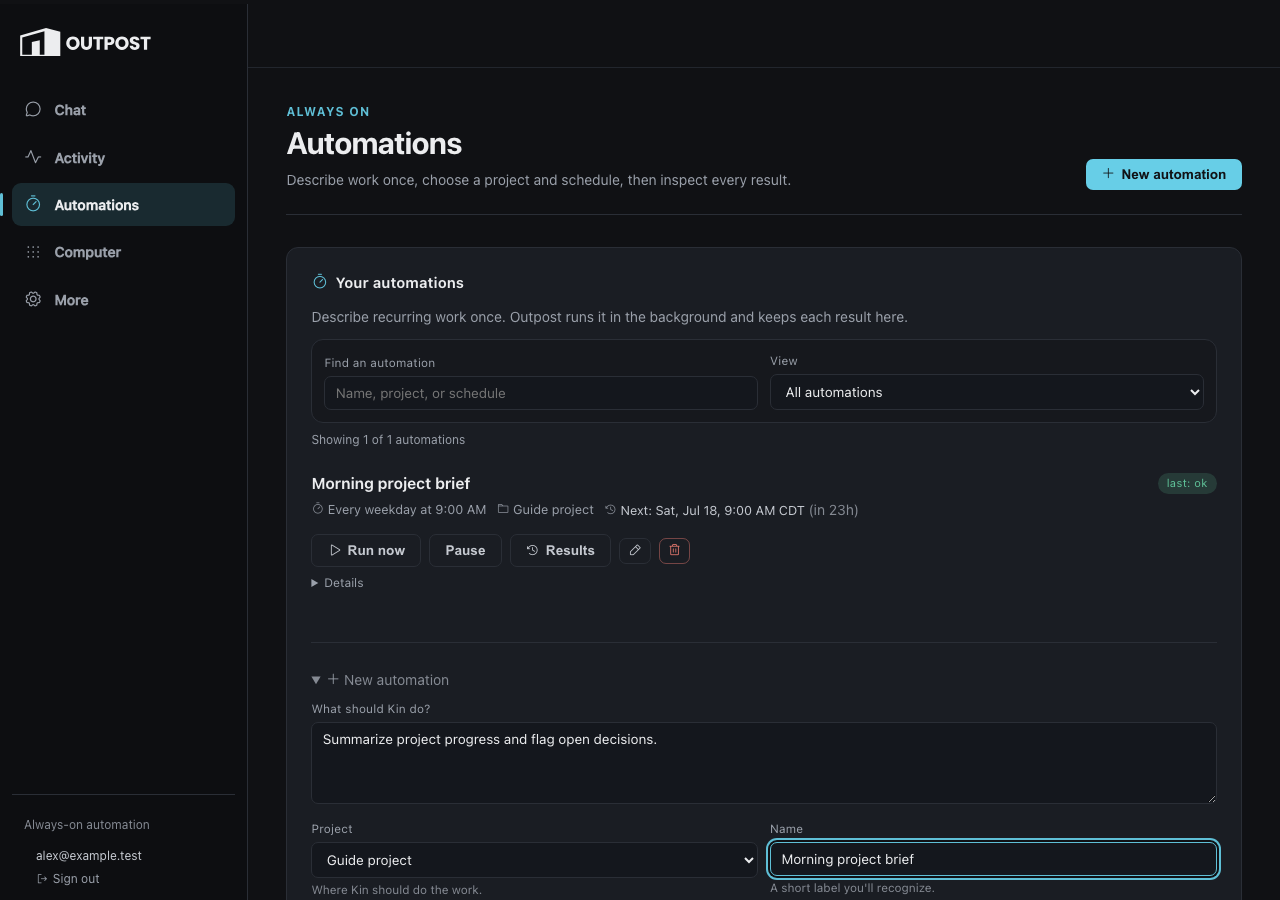
Outpost automations run a saved prompt on a schedule and retain every result.
Choose a project, describe the outcome, pick a schedule, and inspect Activity
when it fires. Recipes are starting points, not hidden behavior: the resulting
prompt and schedule remain visible.
[](/docs-assets/kin/assets/screenshots/outpost_automation_create.png)
*Automation creation begins with the work and project; advanced execution
details remain available without leading the form.*
Go to [Outpost overview](/docs/kin/guide/outpost/) for the browser tour or
[Automations](/docs/kin/guide/scheduled-jobs/) for the exact scheduling contract.
### Keep the conversation on your phone
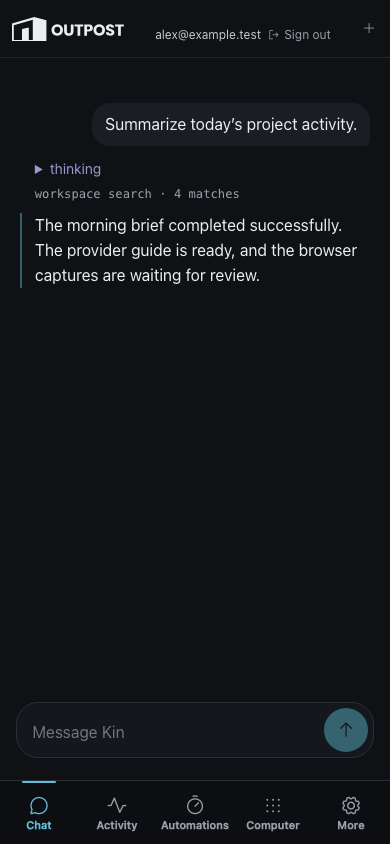
Outpost Chat is the direct conversational surface. It can summarize activity,
show tool progress, and bring you to durable questions that need a decision.
The account chip shows the verified identity; **Sign out** ends that
authenticated browser session.
[](/docs-assets/kin/assets/screenshots/outpost_chat_mobile.png)
*Mobile Chat keeps the composer and primary destinations reachable while the
verified identity and Sign out remain visible in the top bar.*
Read [Chat](/docs/kin/guide/chat/) for the interaction model and
[Notifications](/docs/kin/guide/messaging/) for how attention reaches you.
### Delegate a bounded piece of work
Use a [subagent](/docs/kin/guide/subagents/) for a focused independent investigation,
a [workflow](/docs/kin/guide/workflows/) for a visible multi-step run, or
[Beam](/docs/kin/guide/beam/) when local work should continue on Outpost. Each surface
keeps status and results visible; delegation does not bypass the same tool and
permission boundaries.
## Find the right depth
- **Use Kin** is practical daily operation: files, search, memory, modes,
sessions, commands, web tools, research, and MCP.
- **Agents & automation** covers skills, subagents, workflows, and headless
runs.
- **Outpost** covers Activity, automations, Chat, notifications, Beam,
triggers, and Rig.
- **How Kin works** explains architecture, permissions, agents, tasks, and
visual identity.
- **Reference** is the complete provider, sandbox, CLI, environment, settings,
event, and protocol surface.
- **Maintainers** preserves testing, decisions, extension, multi-machine, and
Outpost operations material without placing it in the everyday path.
If something looks wrong, first confirm the model and workspace in the welcome
screen. Provider errors belong in [Connect a model and first
run](/docs/kin/getting-started/first-run/#troubleshooting); permission prompts belong
in [Modes & approvals](/docs/kin/guide/modes-and-permissions/#troubleshooting); remote
service and deployment issues belong in [Outpost
operations](/docs/kin/internals/outpost-operations/#troubleshooting).
Kin is a terminal-based AI peer for working in a real project. It can read and
change files, run tools, search the workspace, coordinate agents, and keep a
durable session. Outpost carries the same working relationship into an
always-on browser surface for Chat, scheduled work, and attention.
“Peer” describes an [engineering philosophy](/docs/kin/concepts/ai-peer-philosophy/),
not a claim about sentience: design for understanding and collaboration,
calibrate before blaming the model, and verify every important claim.
## Start here
The shortest path from a checkout to useful work is three page transitions:
1. [Install Kin](/docs/kin/getting-started/install/).
2. [Connect a model and launch](/docs/kin/getting-started/first-run/). The in-app
`/providers` flow is the recommended route.
3. [Send your first message](/docs/kin/getting-started/first-session/).
If Kin is already installed, go straight to
[Connect a model and first run](/docs/kin/getting-started/first-run/). You do not need
to read the reference pages before starting.
[](/docs-assets/kin/assets/screenshots/welcome_banner.svg)
*The welcome screen is the final connection check: confirm the model and
workspace, then send a message.*
## Four everyday paths
### Work with Kin in the terminal
Start with a concrete outcome: “explain this failure,” “change the parser and
test it,” or “find every caller of this function.” Kin streams its answer,
keeps reasoning collapsed, and renders tool calls as a compact work log.
File-writing tools show intentional diffs with one context line and a
`(+N -M)` badge; reads and review output stay collapsed until you ask.
[](/docs-assets/kin/assets/screenshots/timeline_states.svg)
*The timeline distinguishes explanation, reasoning, tool work, edits, and
interruption without turning the transcript into a debug console.*
Continue with [First session](/docs/kin/getting-started/first-session/), then keep
[Files & tools](/docs/kin/guide/tools/), [modes and approvals](/docs/kin/guide/modes-and-permissions/),
and [keybindings](/docs/kin/guide/keybindings/) nearby.
### Create work that runs later
Outpost automations run a saved prompt on a schedule and retain every result.
Choose a project, describe the outcome, pick a schedule, and inspect Activity
when it fires. Recipes are starting points, not hidden behavior: the resulting
prompt and schedule remain visible.
[](/docs-assets/kin/assets/screenshots/outpost_automation_create.png)
*Automation creation begins with the work and project; advanced execution
details remain available without leading the form.*
Go to [Outpost overview](/docs/kin/guide/outpost/) for the browser tour or
[Automations](/docs/kin/guide/scheduled-jobs/) for the exact scheduling contract.
### Keep the conversation on your phone
Outpost Chat is the direct conversational surface. It can summarize activity,
show tool progress, and bring you to durable questions that need a decision.
The account chip shows the verified identity; **Sign out** ends that
authenticated browser session.
[](/docs-assets/kin/assets/screenshots/outpost_chat_mobile.png)
*Mobile Chat keeps the composer and primary destinations reachable while the
verified identity and Sign out remain visible in the top bar.*
Read [Chat](/docs/kin/guide/chat/) for the interaction model and
[Notifications](/docs/kin/guide/messaging/) for how attention reaches you.
### Delegate a bounded piece of work
Use a [subagent](/docs/kin/guide/subagents/) for a focused independent investigation,
a [workflow](/docs/kin/guide/workflows/) for a visible multi-step run, or
[Beam](/docs/kin/guide/beam/) when local work should continue on Outpost. Each surface
keeps status and results visible; delegation does not bypass the same tool and
permission boundaries.
## Find the right depth
- **Use Kin** is practical daily operation: files, search, memory, modes,
sessions, commands, web tools, research, and MCP.
- **Agents & automation** covers skills, subagents, workflows, and headless
runs.
- **Outpost** covers Activity, automations, Chat, notifications, Beam,
triggers, and Rig.
- **How Kin works** explains architecture, permissions, agents, tasks, and
visual identity.
- **Reference** is the complete provider, sandbox, CLI, environment, settings,
event, and protocol surface.
- **Maintainers** preserves testing, decisions, extension, multi-machine, and
Outpost operations material without placing it in the everyday path.
If something looks wrong, first confirm the model and workspace in the welcome
screen. Provider errors belong in [Connect a model and first
run](/docs/kin/getting-started/first-run/#troubleshooting); permission prompts belong
in [Modes & approvals](/docs/kin/guide/modes-and-permissions/#troubleshooting); remote
service and deployment issues belong in [Outpost
operations](/docs/kin/internals/outpost-operations/#troubleshooting).